Delivery Date
Your customers choose the day their order arrives, and the window it arrives in, from the days you can actually do. You cap how many orders each window takes, so a busy Saturday stops selling itself. And you read the day's work off one printable sheet with every order on it, grouped by window.
It is for a store that delivers with its own van, or takes pickup slots, or makes things to order: any store where when is a promise rather than a courier's estimate.
What it does
- A picker at checkout, in the shipping-method block your theme already renders. It lists only the days that work, rather than a month grid that is mostly unavailable, weekday name first, today and tomorrow named rather than dated.
- Windows with caps, per day if you like, or a cap on the whole weekday. A window that fills up stops being offered. A day whose windows are all full drops out.
- Your delivery week, with closed dates, a cut-off, preparation time, and a horizon, all previewed on the screen you set them on, over the next fortnight, with a line that explains each date rather than just printing it.
- A calendar per shipping method where you need one, so Pickup can run on Saturday mornings while the courier does not, and limited to some customer groups if you like, so trade customers get a Saturday that retail ones do not.
- Preparation time per product, on core's own product form, taken as the largest in the basket rather than the sum.
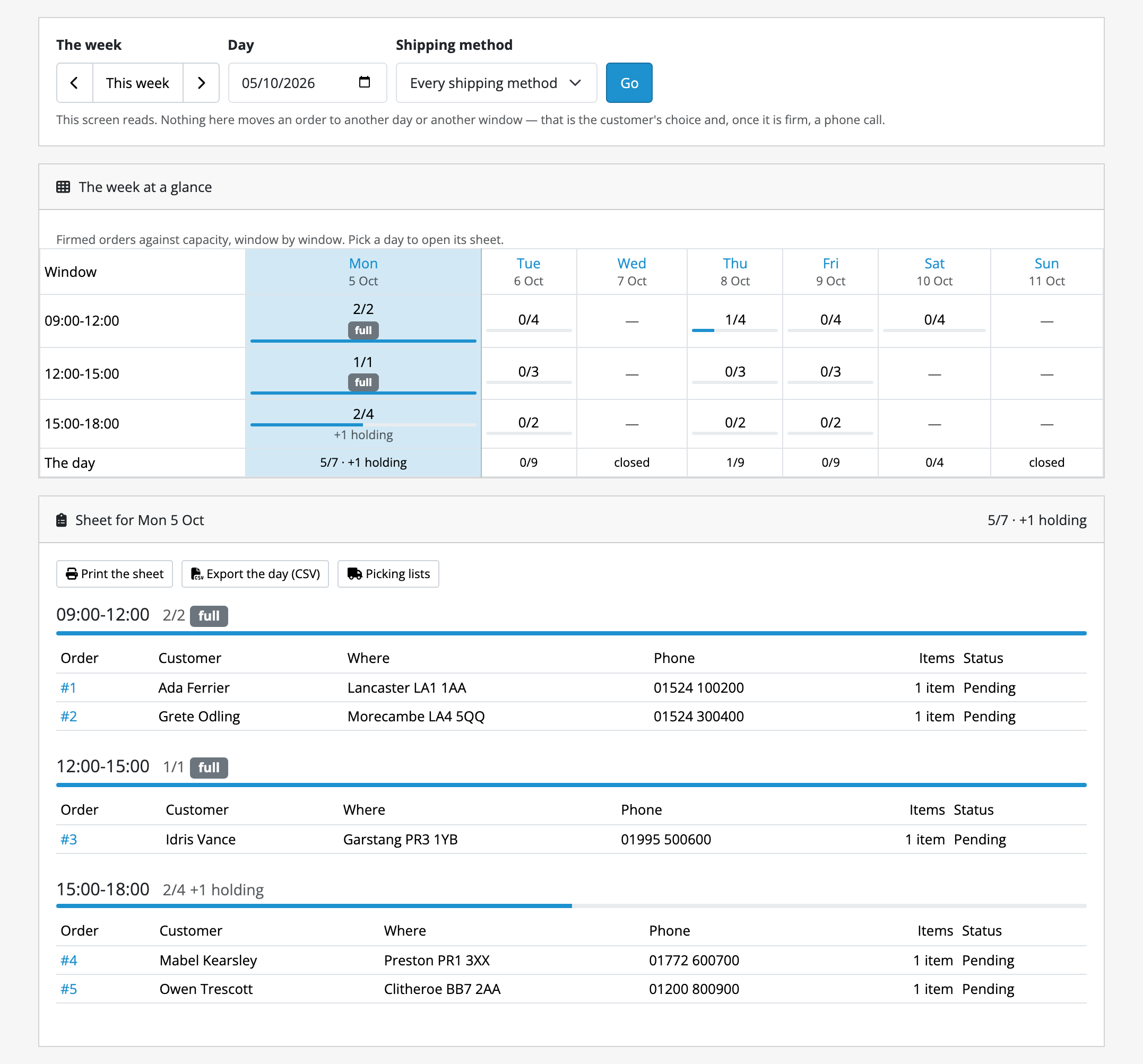
- A day-sheet planner at Sales → Delivery Days: the week's occupancy above, the day's orders below, with a print document for the warehouse and a CSV of the day.
- The day on core's printed invoice and shipping list, under the shipping method, so the packer holding the paper knows which day the parcel is for.
- A day changed on the order page. A firm booking, or an order that could not be given a day, is given a new day and window from core's own order page, by staff you allow to.
- One sentence in your own words. What a customer is told when their order has no delivery day yet (at the checkout, in their order history, in the confirmation email and on their own order page) is a single box under Wording on the settings screen, written once per language. Leave it empty and the wording we ship is used, shown in the box in grey. What you write survives an update.
- One promise, kept in writing. We will never deliver earlier than the day the customer chose. If the day cannot be kept they are moved to the next day that can be, and told: at checkout, in the confirmation email, on their own order page, and in the order history.
What it does not do
Read this before buying.
- It does not charge for delivery. A slot cannot cost money, and Saturday cannot cost more than Tuesday. What shipping costs is left entirely to core.
- It does not narrow availability by geo-zone, country or postcode. A calendar is bound to shipping methods, narrowed only by customer group.
- It shows no delivery estimate on the product page or in the basket. The picker is at checkout and nowhere else.
- The planner is read-only. A booking's day is changed on the order's own page, one order at a time, never on a closed date, and the customer is not told for you.
- The customer cannot change their date after ordering either. They contact you.
- It talks to no carrier. Nothing is booked with a courier, no label is produced, no tracking is read.
- A cap counts orders, not weight, volume or items.
- The day sheet covers the default shopfront only. On a multi-store installation, orders from a second shopfront are not on Sales → Delivery Days.
The full list, with the reasoning and the edges (including the one hour a year daylight saving makes a cut-off ambiguous), is on limits and guarantees.
The rest of this section
- Requirements & install: the OpenCart releases it runs on, the permissions, and what installing creates.
- Quick start: enabled to a test order on a day sheet, in fifteen minutes.
- Guides: capping a day, closing for a holiday, giving Pickup its own Saturdays, a Saturday for trade customers only, per-product preparation, planning the day, giving an order a new day.
- Reference: the calendars, the tables, the screens and the settings.
- Limits & guarantees: exactly what Delivery Date promises, and where that promise stops.
- Troubleshooting: when it does not behave.
- Changelog: what changed in each release.
Whichever extension you bought, the shared pages apply to it too.