Limits and guarantees
Import/export is sold on being trustworthy about what it will change and on being able to put it back. This page is where that promise is written out exactly, including where it stops. Read it before you point Import/export at a catalogue you care about.
At a glance
| If you are asking | The short answer |
|---|---|
| Will rollback overwrite edits made since the import? | No. A record edited or deleted since the import is reported and left exactly as it is. More |
| If the store changed after the plan, does apply write what it still can? | No. If any record has moved on, the whole job stops with nothing written. More |
| How long can I roll a job back? | For as long as Keep rollback data for says; a fresh install keeps 30 days. A purge is not reversible. More |
| Does uninstalling delete the history? | No. Uninstall removes its settings but deliberately leaves its history tables in place. More |
| Does Import/export move a category? | No. Changing a category's path describes a different category, and Import/export creates it. The original stays where it is. More |
| Does an order import take stock, award points or send emails? | No. Import/export writes the rows and never calls OpenCart's order history path, and totals are never recalculated. More |
| Can customer passwords be imported? | No. A customer Import/export creates has no usable password until they use Forgotten Password. More |
| Where does generated text come from? | A completion is posted to api.anthropic.com or api.openai.com, fixed in the source. Orders, customers, reviews and coupons are refused. More |
| Can exports run on a schedule? | Yes, for catalogue records, and only once you switch a profile's schedule on. Orders, customers and coupons are never exported on a schedule, and the feed URL never makes an export itself. More |
| Will an import delete records my file no longer carries? | Only if you turn mirroring on. It is off unless you do. More |
What rollback restores
Rolling a job back walks everything that job actually wrote, in reverse, and:
- Restores the previous value of every field the import changed. The value restored is the one the field held immediately before that job wrote it, which is recorded at the moment of writing rather than reconstructed afterwards.
- Deletes the records the import created. A product that only exists because the import created it goes away again.
- Restores the records the import deleted, if the job was mirroring a source and swept records out. A deleted record is put back under the identifier it had before, so order lines, reviews and other products' related-product lists still point at it.
- Restores data in the extra tables the import wrote to: the product tables
beyond
oc_product, and any table belonging to another extension that you mapped fields into. Those tables go through the same code path as every other field, so rollback cannot skip them. - Removes the import label the job put on the records it touched.
Rollback can be previewed before you confirm it. The preview is the same computation as the rollback itself with the writing left out, so what you confirm is what happens.
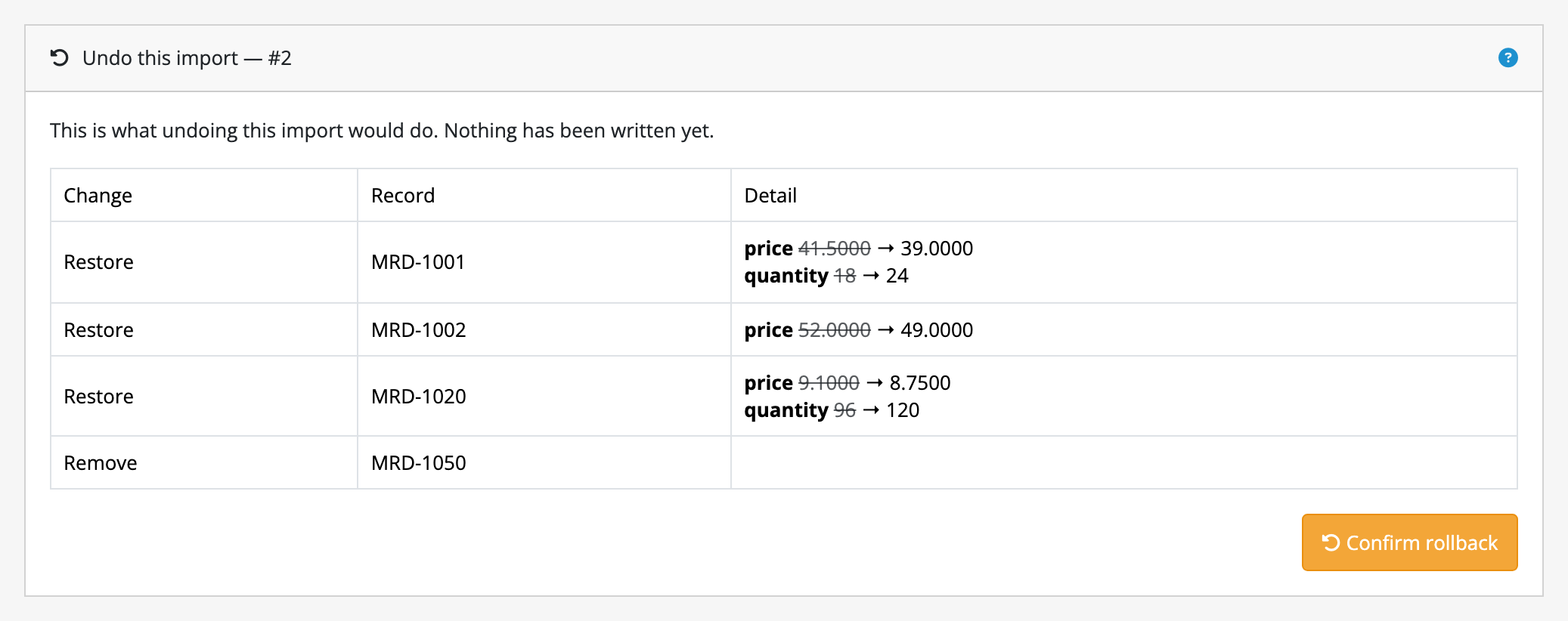
Every record the job touched is listed with the value going back, and the product the import created is marked for removal. Nothing has been undone at this point; the button is still ahead of you.
What rollback does not restore
- Fields the import did not write. If somebody edited a product's description while your price import was in flight, that description is their change, not yours, and rollback leaves it alone.
- Records that have moved on since. A record whose imported fields have been edited since the import, or that has been deleted since, is reported and left exactly as it is. Rollback will not overwrite somebody else's later work in the name of undoing yours. You get a list of what it declined to touch, and you decide what to do about it by hand.
- The distinction between an empty value and no value at all. A database
column that held nothing (
NULL) before the import comes back as that column's empty value (an empty string, or0for a number) because a plan holds text. For almost every field OpenCart uses this is indistinguishable; it is written down here because it is a real difference. - Rows in extra tables that the import brought into existence. If a record had no row in one of those tables before, rollback empties the row rather than removing it. The exception is a record the import created outright: deleting it takes its rows in those tables with it.
- Anything outside the store's database beyond the images the job wrote. Image files are handled: rolling back removes an image the job added, and puts back the one it replaced, from a copy kept at the time. Nothing else on disk is touched, and no backup of the rest of your store is taken or implied.
- The coupons and filters that pointed at a deleted category. Deleting a
category takes its place in the tree with it, and with it the rows in
oc_coupon_categoryandoc_category_filterthat named it. The products filed under the category are restored, because they are part of the category as Import/export reads it, but those two are not. This only arises where a job swept out a category that existed before it ran; a category the job created had none of them to lose. - Changes made by a different Import/export job. Rollback undoes one job. If two jobs wrote the same field in sequence, rolling the first one back is refused for those records under the same rule as any other later edit: the value no longer matches what that job wrote.
Conflict detection: what happens when the store moved
Between the moment a plan is made and the moment it is applied, your store keeps running. Somebody edits a product; another import runs; a stock sync lands. Import/export assumes this rather than hoping otherwise.
Before apply writes anything, it re-reads every record the plan names and compares each against the value the plan recorded for it. The comparison is per field, not per record: a quantity somebody adjusted by hand is not in the way of a plan that only writes prices. The fields the plan does not touch are not consulted.
If any record has moved on, the whole job stops with nothing written. There is no partial apply and no skipping ahead to the next record. A catalogue half-changed by a plan nobody reviewed is worse than a change that did not happen. Your plan is still there; the usual response is to plan again against the current state of the store and read the new preview.
Apply reads the stored plan and never re-reads your source file, so what it writes is what the preview showed, even if the file changed underneath it in the meantime.
The same rule protects rollback, in the mirror image: rollback checks each record against what the job wrote, and declines the ones that no longer match, reporting them to you instead.
Two further guards:
- Two jobs never interleave on the same entity. A job about to start asks whether another job is already running on the same kind of record, and waits if one is.
- A cancelled apply is still fully reversible. Stopping part-way through leaves a coherent catalogue, the rest of the plan unapplied, and everything that was written still rollable-back.
The retention window
Rollback is available for as long as the job's plan and journal exist, and how long that is is yours to set: Keep rollback data for, on Import/export's own screen, in days. A fresh install keeps 30 days.
What follows from that:
- Purging is scheduled, and needs no server setup. Import/export registers a daily job on OpenCart's own cron, which most stores already run. Each run throws away the plan and journal of every finished job past the window, a batch at a time; what is left waits for the next run.
- Expired means expired. A job whose data has been purged is listed in the history as Rollback data purged, and asking to roll it back is refused with that reason rather than half-attempted. Everything else about the job stays: what it did, how many records it created and changed, and who ran it.
- 0 keeps everything. A store that would rather trade disk space for an undo that never expires can say so, and nothing is purged until somebody asks.
- You can clear it now. Clear stored plans and journals throws away the plan and journal of every finished job immediately, whatever the window says, which is what you want before handing a store over. Jobs still running are left alone.
- Purging takes the files too. The staged images a plan fetched, the copy of the source file it was reading, an export nobody downloaded, and the images an apply replaced all go with the rows. That last one is the reason a purge is not reversible: the pictures rollback would have put back are gone.
- Uninstalling does not delete any of it. Import/export's uninstall removes its
settings but deliberately leaves its history tables in place, because
uninstalling and reinstalling is the routine way to upgrade an OpenCart
extension, and an uninstall that tidied up after itself would destroy your
safety net at the worst possible moment. Reinstalling picks the history back
up. While it is uninstalled, the store's own scheduler purges nothing and
runs no profile: the two rows stay listed under Extensions → Cron Jobs,
naming a route OpenCart no longer serves, so the window is not applied until
you install again. A crontab line running
preflight.php cronis different. It does not ask whether Import/export is installed, so it carries on purging and running due profiles until you take the line out, and it purges on a 30-day window whatever yours was, because your setting went with the uninstall. On a store that set 0 to keep everything, take the line out before you uninstall. - Removing the files does not delete it either. Deleting the extension through Extensions → Installer removes code, not data.
The window is not the only limit
Within the window, rollback is still subject to the conflict rules above. In practice those are the real limit on an old job, since a month-old import is likely to have been edited over.
Who did what
Every job records the administrator who planned it, the one who applied it and the one who rolled it back, as three separate answers, because they are often different people. They are listed against each job in Past jobs. A scheduled or command-line run has no administrator behind it and says so by naming none.
Limits on what apply writes
- Only the fields your plan describes. A product's modified date is not stamped just because Import/export touched the product.
- A newly created product is a valid row, not a complete product. Fields your mapping says nothing about are filled with the blank value their column declares. If you create products with Import/export, map the fields you actually need.
- A row your file left empty is not a value. The field it was mapped to is left untouched, rather than being blanked. This is deliberate: a supplier's spreadsheet with a gap in it should not empty a description you wrote.
- A value that cannot be read is rejected, not coerced. A price of
abcis reported as an error against its row number; it never becomes0.00. - Where two records share the value you match on, the older one is
updated. Two products with one model is a mistake in the catalogue, and
Import/export does not guess which you meant: every row naming that model is
planned against the product with the lowest identifier, every time, and the
other is left alone. That is the rule for
modelandsku, and for every other kind of record's match field. - A product identifier two products share is refused instead. Matched on
upc,ean,jan,isbnormpn, a row whose value more than one product carries is an error in the plan,ean matches 2 products; match on a field they do not share, and neither product is written. OpenCart 4.1 copies a product's identifiers into every variant made from it, so a shared EAN is how such a store is built rather than a mistake, and the lowest identifier would be an arbitrary variant. A value that becomes shared after the plan was made stops the job at apply, as any other change to the store does.modelandskukeep the older rule above, because changing it would change what jobs you already run do.
Limits on categories
- A category is identified by where it sits, spelled
Home > Widgets > Blue. Two categories calledBlueunder two parents are two categories, which is what makes a flat file able to describe a tree at all. - Import/export does not move a category. Changing a category's path in your feed describes a different category, and Import/export creates it. The original stays where it is. If you are reorganising a tree, do it in OpenCart's own category form, or import the new shape and remove the old branch deliberately.
- A category's parent is part of its path, not a field beside it. There is no
parent_idto map: the path already says where the category goes. A feed whose paths carry no parent at all can be given a default one with theundertransformation, which files a bare name under a parent you name and leaves a path that already has one alone. - The last level of the path is the category's name in your store's default
language, unless your mapping binds
nameitself. Other languages are mapped asname:de-delike any other translated field. - Levels the store does not have are created as the import runs, and they are recorded like anything else the job wrote, so rolling the job back removes them again.
Limits on attributes
- An attribute is a name and a group. The value, such as
2.4kg, belongs to the product, not to the attribute, and is written through the product's ownattributesfield. Importing attributes builds the vocabulary those values are written against. - An attribute names its group rather than numbering it. There is no
attribute_group_idto map:groupstands in for it and carries the group's name, so the same file imports into a store that numbers its groups differently. - A group your store does not have is reported, not created. An attribute filed under a group nobody named would be invisible on every product form that used it, so an unknown group is counted as an anomaly in the plan. Import the groups first, as one job, and the attributes second.
- Attribute groups and attributes are matched on their name in your store's default language. OpenCart allows two groups to hold an attribute of the same name; where yours does, Import/export plans against the first of them.
- An attribute assigned to a product with no value stays empty. OpenCart's
own product form allows it, and
Weight:in a product'sattributesfield is read the same way. Where you would rather have a value, thedefaulttransformation supplies one before the attribute name is put in front of it. Like every transformation, it runs while planning, so the preview shows the literal text apply will write. - Deleting an attribute leaves the values products gave it. Those rows belong to the products that wrote them, and no journal of the attribute's own job could put them back. The same is true of a group and the attributes under it: OpenCart's own form will not delete a group that still has any.
Limits on options and their values
- An option is the question; its values are the answers.
Sizeis an option,LargeandSmallare its values, and each is a record you import in its own right. What a product then charges for a value (the price, the weight, the stock it subtracts) belongs to the product and is written through the product's ownoptionsfield. - An option's
typeis required. It is what the storefront draws (a dropdown, radio buttons, a text box), and OpenCart's own form will not save an option without one. - A value names its option rather than numbering it. There is no
option_idto map:optionstands in for it and carries the option's name, so the same file imports into a store that numbers its options differently. An option your store does not have is counted as an anomaly in the plan rather than written as - Import the options first, as one job, and the values second.
- Values are matched on their name, in your store's default language.
OpenCart lets two options each hold a value of the same name (
Redunder bothColourandRibbon), and where yours does, Import/export plans against the first of them. A feed that cannot live with that carriesoption_value_idand is matched on it instead; the identifier your file supplies is written as given and kept. - Re-importing a value leaves the products pointing at it alone. Import/export
matches an existing value and updates it, so
oc_product_option_valuestill points where it pointed. OpenCart's own option form deletes and re-adds every value each time you save it, which does not. - Deleting an option does not delete its values. They are records with their own history, and no journal of the option's job could put them back, so rollback could not keep its promise. Remove them as their own job, or use OpenCart's own option form, which tidies both at once and refuses to touch an option products are still using.
Limits on filters and their groups
- A filter is a name and a group.
RedunderColour. Which categories offer it belongs to the category, and is written through the category's ownfiltersfield. Importing filters builds the vocabulary those assignments are written against. - A filter names its group rather than numbering it. There is no
filter_group_idto map:groupstands in for it and carries the group's name, so the same file imports into a store that numbers its groups differently. A group your store does not have is counted as an anomaly in the plan rather than written as 0. Import the groups first, as one job, and the filters second. - A category names a filter by its group as well as its own name, written
Colour > Red. That is the spelling an export writes, and the only one that is never ambiguous: OpenCart lets two groups each hold aRed. A bareRedis accepted and resolves to the first filter of that name, and#12names one by identifier. A filter your store does not have is counted as an anomaly rather than assigned. - Filters are matched on their name, in your store's default language, and
where two groups hold one of the same name Import/export plans against the first
of them. A feed that cannot live with that carries
filter_idand is matched on it instead; the identifier your file supplies is written as given and kept. - A category's filters are replaced by what your file says, unless you say add. Tick Add to list beside the column and what your file names is added to what the category already offers instead. The merge happens while the plan is made, so the preview shows the whole list apply will write, and rollback puts back the list that was there.
- Deleting a filter takes the categories' and products' assignments to it with it. OpenCart declares those rows as foreign keys, so a filter cannot be deleted while anything still points at it. Its own form clears them for the same reason. Rollback puts the filter back; it does not put those assignments back, because they belong to records the job never planned.
- A filter group still holding filters cannot be deleted. OpenCart's schema refuses it, as its own form does. Remove the filters first.
Limits on coupons, reviews, downloads and stores
- A coupon is its code. Two coupons cannot share one, so the code is what a feed is matched on. The products and categories a coupon is restricted to are fields like any other, and leaving both empty is what OpenCart reads as "everything", so a feed that stops carrying a restriction removes it.
- Deleting a coupon takes its redemption history with it, as OpenCart's own coupon form does. Rollback puts the coupon back; it does not put that history back.
- A review is matched on
review_id, and nothing else. A review has no natural key (two shoppers can leave the same rating on the same product on the same day), so matching on the product and the author would silently fold one review into another. Your feed carries the identifiers the reviews had wherever they came from, and Import/export keeps them. - A review names its product by model. A model your store does not have is counted as an anomaly in the plan rather than written as product 0, so you see it before you apply.
- Import/export writes a download record, never the file. Importing a download into a store where that file is not already under the download directory produces the same broken download OpenCart's own form would.
- The default store is not one of these records. OpenCart keeps store 0's
name and address in its settings rather than in the
storetable, so it is neither exported nor matchable. Every other kind of record still refers to it asDefault. - A store this creates is a row, not a configured shop. Its settings are yours to fill in on OpenCart's own store form.
- Deleting a store leaves the assignments that belong to other records. The
rows in
oc_product_to_storeand its siblings were written by the products and categories that made them, and sweeping them out would change records the job never planned, and no journal of this job could put them back. So they stay, which is what lets rollback restore the store under its old identifier and have everything point at it again. If a store really is going for good, remove it on OpenCart's own store form, which tidies all of that up.
Limits on orders
- An order import is history, not order creation. OpenCart has no admin-side API for writing an order, and the side effects a shop must never repeat (stock coming off the shelf, reward points, a coupon counted as redeemed, a confirmation email) live in its order history path rather than in the row. Import/export writes the rows and never calls that path, so nothing is decremented, awarded or sent.
- Totals are yours, and are never recalculated. A migrated order was settled
at a price, under tax rules that may have changed since, so Import/export writes
the totals your file states and works nothing out.
totalis therefore a field a new order cannot be created without, and an order whose lines do not add up to it is imported exactly as your file describes it. - An order is matched on
order_id, and nothing else. Two customers ordering the same thing on the same day is ordinary, so there is no other key. Your file carries the order numbers the invoices already show, and Import/export keeps them. - The status, and the country and zone of each address, are names. They are resolved to your store's own identifiers, and a name your store does not have is counted as an anomaly in the plan rather than written as 0, so you see it before you apply. A zone is resolved within the country of the same address, because OpenCart ships two provinces called Limburg and five regions called Central.
- A line item is a snapshot of what was bought. The model and the name are written as your file states them, which is what OpenCart itself keeps: a product renamed since must not rewrite the sale. The line is pointed at the product of that model where your catalogue still has one, and at product 0 where it does not. That is exactly what OpenCart holds for an order whose product has been deleted, and what stops a decade of sales failing to import over something discontinued in year two.
- An order's line items are one field. Each line is one row of the cell,
and the options chosen on it are written in its last position as
Size=Large=select, because OpenCart keys those options to the line rather than to the order. So a changed option is previewed, journalled and rolled back as a change to the line it was chosen on. - Subscriptions, affiliate commissions and vouchers are not part of it. Deleting or rolling back an order takes its lines, options, totals and history, which is exactly what OpenCart's own order form removes; anything else in your database that names the order belongs to a record this job never planned.
Limits on customers
- Passwords are never imported. There is no field for one, plain or hashed,
and there will not be. A plain-text password would put your entire customer
base in a spreadsheet, in an upload directory and in a saved plan; a hash from
another platform is one OpenCart cannot verify against, because it checks with
PHP's own
password_verify()against its own hashing. So a customer Import/export creates has no usable password and cannot sign in until they use your storefront's Forgotten Password link, which emails them a reset. Tell your customers that before you migrate them, not afterwards.tokenandcode, OpenCart's session and reset credentials, are withheld for the same reason. - A customer is matched on their email address, which is what they sign in
with and the one thing about an account that has to be unique. A migration
that carries the identifiers the accounts had elsewhere can match on
customer_idinstead. - The customer group is a name, and it is required. OpenCart's own customer form requires one, and a group decides what an account is charged and whether it needs approving, so a group your store does not have is counted as an anomaly in the plan rather than created from a spelling mistake in a spreadsheet.
- Every address a customer has is one field. Each address is one row of the
cell, written as
firstname:lastname:company:address_1:address_2:city:postcode:country:zone:default:custom_field. The country and zone are names resolved to your store's identifiers, a zone within the country of the same address; a name your store does not have is an anomaly in the plan rather than a 0 in the row. The custom fields are last in the row because OpenCart's own shape for them contains colons, and the last position keeps everything after the separator before it. - Rewriting a customer's addresses gives them new address identifiers. An address has no natural key, so a job that changes one replaces that customer's address rows. A run that changes nothing writes nothing and leaves them alone.
- Approval is a row, not a column. OpenCart records an account awaiting
approval as a row in
oc_customer_approval, so an approved account carries nothing inapprovals, and a blank cell in your file says nothing about an account rather than approving it. - Deleting a customer leaves their orders, reviews and returns. Import/export removes exactly what OpenCart's own customer form removes: the account, its addresses, its approval, and the activity, tokens, history, rewards, transactions, wishlist, IPs and affiliate rows that belong to nobody else. Rolling that back restores the account and its addresses; it does not restore the reward points, transactions or wishlist, which are swept rather than journalled.
Limits on exporting
- An export is one kind of record per file. Products and categories are two exports. You choose the fields, the format and which records to reach, but not two kinds of record in one file.
- Every filter is optional, and an export with none of them set is the whole catalogue. You can narrow it to records in named categories, exclude records in others, and filter on manufacturer, store, a fragment of the model, a stock range, and the dates a record was added or last changed. Excluding beats including, which is the only reading that makes "everything under Clearance except the bundles" expressible.
- Records are named the way the rest of Import/export names them. A category is
its full path,
Home > Widgets > Blue; a manufacturer or a store is the name you see in the admin;#12names any of them by identifier. That is the same spelling the exported file itself carries, so a filter can be copied out of a column and pasted into the form. - A name your store does not have refuses the export. Filtering on a manufacturer nobody has is a typo, not an empty catalogue, so Import/export says which name it could not find rather than handing you a file with nothing in it. Nothing is created to satisfy a filter, which is the opposite of what an import does with the same name.
- A filter or a sort on a field that kind of record does not have is refused. Stock and the model belong to a product; a coupon has neither. The export stops and names the field rather than silently matching everything.
- An export cannot be ordered by a field that is a table of rows, such as a product's categories or images. Those are many rows written into one cell, and there is no single value to sort on. Sorting is by one column, in one direction, and the record's own identifier breaks ties so that the file comes out in the same order however many slices it takes.
- The language filter narrows columns, not records. Ticking German gives you
name:de-deand not a file with two names per product. The default language's fields have no suffix and are always written, because they are what an import writes when it is told no language at all. A file without them is one nothing could put back. - An export can run on a schedule, and only a catalogue export. Saved as a profile from the export form, it takes the same cycles and the same on/off switch as an import (see unattended runs), and is off until you switch it on. An export of orders, customers or coupons is refused a schedule when you switch it on, and when you save over one that already has a cycle: an unattended run would write a fresh copy of personal data or of working discount codes on every cycle with nobody reading it. Those three stay exports somebody logs in to make.
- A scheduled export keeps only its newest file. Each successful run discards the file the same profile's previous run wrote, and keeps that job in the history; downloading it says that a later scheduled run replaced its file, and with which job. An hourly export would otherwise leave seven hundred copies of the catalogue on the disk inside the default retention window. An export made by hand, or with a profile's Run, is never discarded this way; the retention window governs those. A scheduled export that fails leaves no file of its own, so the previous one is still served.
- An image is exported as the path your store holds, such as
catalog/acme.png, not as an absolute URL. That is what makes an unmodified export re-import as no change: an absolute URL would be fetched and staged as a fresh file, and every record would report its picture as changed on the way back in. An import accepts either: a URL in an image column is downloaded and installed. - The feed URL serves the newest finished export; it never makes one. An
outside system asking for
productis handed the file of the most recent finished product export, whatever its fields and format were and whether a person or a schedule made it. A URL that ran a job would be a URL anybody who guessed it could use to run a hundred. On a store with no scheduled export of that kind, which is every store until one is switched on, what it serves is still the last export somebody made and could read; with one, it may be a file nobody has looked at. Each answer carries aLast-Modifiedheader, taken from when the job finished, so a partner can tell a stale file from a fresh one. - An entity nobody has exported yet has nothing to serve, and the request is refused rather than answered with an empty file.
- A purge takes the exports with it. An export past the retention window is deleted along with the plans and journals, so a feed nobody fetched for longer than the window is serving nothing. See the retention window.
Limits on generated content
Generation writes the fields your source did not carry, typically a description, a meta title or a meta description. It is off until a store owner sets up a provider, and a job that asks for nothing generates nothing.
- Orders, customers, reviews and coupons are refused, and it is a refusal rather than a default. There is no setting that turns it on. An instruction may name any field the row maps (that is what makes generation useful), so a prompt about a customer resolves to that person's address, one about an order to both addresses, the comment and the IP, and one about a review to the author's name and whatever prose they wrote about somebody else. A job configured to generate text for one of those four is refused when you save it, and says why on the screen. Nothing is lost by it: generation writes a description, a meta title and a meta description, and not one of those four kinds of record has any of them.
- Where it goes, and you cannot change it. A completion is posted to
api.anthropic.comorapi.openai.com, depending on the provider you chose. Both are operated in the United States. Both addresses are fixed in Import/export's own source rather than read from a setting, so there is no field anywhere on the settings page that points generation at your own server or at a provider in your own country. - What is sent is the instruction, not the row. One request carries the instruction you wrote with that row's mapped values substituted into it, the model name, and the response ceiling. The rest of the record does not go: a field your instruction does not name is never part of the request. What your instruction does name is sent in full, which is why the four kinds of record above are refused outright rather than left to the wording of a prompt. Press Sample rows to read the resolved instruction for the first few rows of your own file: the exact text that would leave your server, before any of it does.
- The provider account is yours. You supply an Anthropic or OpenAI key, and what those calls cost is billed to you by them. Import/export sells no tokens and ships no key, and a job configured to generate text on a store with no provider or no key is refused rather than planned with empty fields.
- The key belongs to the store, not to a job. It is an Import/export setting, so it does not travel in an exported profile that moves between stores. It is also deliberately not carried across an update: the copy that preserves your settings leaves the provider key out by design, so an upgrade asks for it again and generation is off until you answer. That is the direction a store should fail in.
- Import/export retains nothing of what it sends. The prompt is built for the call and discarded with it; what is kept is the text that came back, stored in the plan you review. What your provider retains, and for how long, is between you and them under their own terms. Import/export is not party to that, and cannot answer it for you.
- Text is written while the plan is made, never at apply. The sentence a provider produced is stored in the plan, shown in the preview as the literal text apply will write, conflict-checked against the record like any other value, and put back by rollback. A second call at apply time would write something nobody read, because these providers are not deterministic.
- It fills gaps rather than rewriting your copy. A field your file or the record already filled is left alone unless Fields that already have text says to write over it, so a description somebody wrote by hand is not replaced by one nobody asked for.
- Every job has a call cap, and it cannot be turned off. A mapping mistake against a feed of twenty thousand rows would otherwise be a bill rather than a plan. Once the cap is spent the remaining rows are planned with those fields untouched, which is what the preview and the unchanged count then show. A plan that stops generating has not failed. The cap holds across the slices a long plan takes, and a blank is read as one call, not as no limit.
- The estimate is an estimate. Before planning, Import/export prices the run from a sample of your file and the rates you entered under Input price and Output price; left at zero, it reports the number of calls and no figure. Rates are asked for rather than shipped, because an extension quoting a provider's prices from memory quotes them wrong the month after it ships. A stale rate gives a wrong figure, and the provider's own invoice is the authority.
- A field your store cannot hold is not generated, and a provider that answers with nothing leaves the field as it was rather than emptying it.
- A provider asking you to wait pauses the plan; it does not fail it. A rate limit is waited out briefly and then the slice ends with the rows already planned intact, and the plan resumes. Any other refusal from the provider is reported as the error it is.
- Generated text is not reviewed for you. It is a draft written to your instruction, and reading it is what the preview is for.
The security posture
Import/export's route can be granted to an administrator who is not the store owner, and two of the things an importer must be able to do, reading a file from the server and fetching a URL, are the usual ways such a route is turned into something worse. This is how each is bounded.
- Importing from a server path is refused until a directory is nominated.
There is no default root, on purpose: without one, "import a server path"
would be "read
config.phpand paste it into a preview". A store that has not set Import directory on the server cannot import from a path at all, and says so rather than reading anything. The check is made against the resolved path, so a..segment and a symlink pointing out of the root are the same refusal, and a mistyped root refuses rather than widening. - Nominating that directory takes the permission to install extensions, not
Import/export's own. Import directory on the server and Write exports to
are the two settings that widen what Import/export may reach (the first is
permission to read files, the second permission to write them), so a user group
granted Import/export's screen cannot change either. Guarding them on Import/export's
own route would have been no guard at all: the administrator the root exists to
bound would just nominate
/. Both are still readable by anybody who can see the settings card, because somebody refused a path import needs to be able to see which directory is allowed. - An extra table cannot be one of OpenCart's own. Extra tables names a
table an import writes into, so a core table there would let a group holding
nothing but Import/export write
oc_user_groupand grant itself every permission, oroc_settingand change the two paths above. Every table any supported OpenCart release installs is refused, whether it is typed on the form, carried by a saved mapping or arrives in an imported profile file. - Fetching a URL is restricted to public addresses. The store's own server is
what makes that request, from inside your network, so Import/export speaks only
httpandhttps(file,ftp,phpand the rest are refused), resolves the host before it connects, and refuses every private, loopback, link-local or otherwise reserved address. That is what keeps a limited-privilege administrator away from your internal admin panels or a cloud metadata service. Redirects are followed one at a time and each hop is checked like the first, so a public URL cannot redirect its way inside, and a host answering with one public and one private address is refused rather than gambled on. - Credentials in a source URL are sent as a header, and cut out of anything
that leaves the store.
https://user:pass@supplier.example/feed.csvworks. The URL is stored as you typed it, because a profile that runs overnight has to be able to fetch; what is controlled is where the password travels. It is cut out of every error message, so it does not reach the store log; out of the profile listing the command line'slistprints, so it does not reach a terminal's scrollback or a pipeline's log; and out of an exported profile file, so a configuration committed beside your feed's code does not carry a supplier's password into a repository. The store that imports such a file types the credential in once, the same way it types the provider key in once. The one place it is not cut out is the hidden field the Columns screen uses to carry the source between two requests, where View Source will show it to somebody who already has permission for Import/export's own screens. - The feed URL is off until you set a secret, and every refusal says the same
thing. Set Feed secret to a long random string and an outside system can
fetch the last finished export at
index.php?route=extension/preflight/feed/preflight&entity=product&secret=…, which Import/export's own screen shows you ready to copy. An empty secret refuses everything; a request whose secret does not match exactly is refused; and a wrong entity, a missing export and a wrong secret are all answered with the same plain 404, because a URL that distinguished them would answer questions for whoever was guessing. Treat the secret as a password: anyone holding it can read every catalog export, so serve it over HTTPS and change it by editing the setting when it needs revoking. - Orders, customers and coupons are not served over the feed at all. The kind of record is a parameter of that URL, so one secret reaches every kind the URL can name; a marketplace uploader given your product feed was not given your customer list, and a shared secret is not the thing to stake personal data or a list of working discount codes on. All three are still exported and still downloaded from the job history by somebody who logged in. Feeding one of them to a partner would need a credential per feed, which is a feature Import/export does not have rather than a setting it hides.
- Exports are not written where the web can reach them. Left empty, Write exports to keeps finished exports in Import/export's own storage directory and the admin screen streams them to you. If you name a directory, one inside your store's image directory is refused, because everything under that is a public URL.
- A provider key is stored as a store setting and sent to nobody else. The address a completion is posted to is fixed in the extension rather than configurable, so generation is not a second place a URL can be pointed anywhere, and no error message carries the header the key was sent in.
- Everything else is OpenCart's own security. Import/export adds no login, no
session and no second permission system: access to its screens is the
extension/preflight/module/preflightpermission on a user group, as install describes. Anyone who can open Import/export can read any record it can export, so grant it as you would grant access to the catalogue itself.
Limits on mirroring a source
Mirroring (deleting or disabling records your file no longer carries) is off unless you turn it on, and when it is on:
- A source carrying fewer rows than you said it should is refused outright, before a plan exists. Nothing is planned and nothing is written.
- Deletions are ordinary planned operations: counted in the headline, listed, conflict-checked and recorded for rollback like anything else.
- The first deletion a job plans has to be acknowledged before apply is offered, by default.
- A sweep can be restricted to records carrying a given import label, so two feeds can mirror the same catalogue without deleting each other's products.
- Rows your rules skipped, and rows that were rejected for a bad value, are not treated as missing from the source.
- A record with nothing in the field you match on is never removed. A job matched on SKU, or on EAN or any other product identifier, cannot name a product that has none, so a product you added by hand without one is outside what the feed can speak about, not missing from it.
- A product whose identifier your file refuses as shared by several products is still counted as seen, so a mirror removes none of them.
Limits on unattended runs
A saved profile can be given a schedule (hourly, daily, weekly or monthly), and Import/export runs it from the cron your store already has. What that promises, and what it does not:
- Nothing new goes on the server. Import/export registers two jobs on OpenCart's own cron: one that purges expired rollback data daily, and one that looks hourly for profiles that are due. If your store's cron is not running, neither is your schedule. That is the one thing to check first when a feed did not happen.
- OpenCart 4.1.0.4 cannot run either of them, and a crontab line runs both.
That release's
cron.phpstarts without the composer autoloader, so every scheduled task on the store fails inside OpenCart's own code before an extension is reached. It is OpenCart's bug rather than Import/export's, and no extension can repair it. What Import/export does instead is run both passes from a command, which needs nothing of OpenCart's scheduler. Imports you run from the admin yourself are unaffected either way, and Import/export's own screen says on such a store which release it is and what it has stopped. The releases whose own scheduler runs them are on requirements. - A schedule is only as exact as that cron. An hourly profile on a store whose cron fires twice a day runs twice a day. The command-line runner is the way to get exact times.
- Switching a schedule off keeps it. The cycle and the apply setting stay as they were, so pausing a feed for a fortnight is one switch rather than a reconfiguration.
- A run applies only if you said it may. Left off, which is how a profile starts, a scheduled run plans the import and stops. The plan waits in the admin exactly as if you had pressed Plan yourself, and you apply or abandon it.
- An export run writes its file and is done. It has no plan, no anomalies and nothing to apply, so Apply automatically is not offered for it. It is listed as exported, and is emailed about only when it fails.
- Anomalies always stop a run, whatever it is set to. A run that turns up an anomaly leaves the plan waiting and emails your store's own address. This is not overridable: an unattended run that could drive through your thresholds would make them decoration.
- A run never applies part of a plan. The conflict check described above applies unchanged: one record that has moved on stops the whole job with nothing written.
- A failed run cleans up after itself. A run that could not read its source, or that fell over while planning, throws away its half-written plan and the images it had staged. A run that had already begun writing is left alone instead, because what it wrote is journalled and still reversible.
- Every run is readable without server access. Import/export's screen lists the recent runs: which profile, what started it, what it did, its counts, how long the whole thing took including fetching the file, and the error if it failed. A run that never got as far as opening a job, such as when a supplier's server did not answer, is listed too, with the reason.
- The run list is thinned by the retention window, like plans and journals. Unlike them it is only a log: the jobs it points at keep their counts for good.
Running a profile from the command line
For a schedule OpenCart's four cycles cannot express, or for a deploy pipeline:
cd /path/to/store
php extension/preflight/preflight.php list
php extension/preflight/preflight.php run "Supplier feed" --apply
php extension/preflight/preflight.php due
php extension/preflight/preflight.php runs
- Profiles are named rather than numbered, so the same command works against a staging store and a production one.
--applyand--plan-onlyoverride what the profile itself is set to do. An export profile ignores both, since it writes a file and never the store.- The exit status is 0 when the run did what it was asked, 1 when it failed, and 2 when it planned an import and stopped on anomalies for you to review. Both non-zero cases mean the import is not done.
- A command-line run is recorded and reported exactly like a scheduled one, so somebody who was not at the terminal can still see what happened.
Running the scheduled passes yourself
due runs the profiles that are due and prints what each one did, which is what
you want at a terminal. The other command is for a crontab:
10 * * * * cd /path/to/store && php extension/preflight/preflight.php cron
cronruns both scheduled passes (the due profiles and the daily purge), and it is not a second implementation of either. It calls the same two jobs OpenCart's scheduler calls, so what you get is what a working store cron gets: runs recorded as scheduled rather than as yours, the email about a run that needs you, and both passes' lines in the log on a quiet night as well as a busy one.- It prints nothing when it worked, because cron emails you whatever a job prints and an hourly line is a line nobody reads. What each pass did is in Automatic runs and in the log.
- It exits non-zero only if it could not reach the jobs at all. A supplier whose server was down is that feed's bad morning rather than the schedule's: the pass carries on to the next profile and exits clean, and the failure is emailed and recorded.
- Run it hourly. Each pass decides for itself whether there is anything to do, exactly as it does under OpenCart's scheduler, so running it more often than your shortest cycle costs two quick queries and changes nothing.
- This is the supported way to schedule on OpenCart 4.1.0.4, whose own
scheduler cannot run. It is equally the way to schedule on any store whose host
does not call
cron.php, or where you would rather run one scheduler than two. - It can only be run from a terminal. A web request to the same file is refused before it reads anything at all, and so is a request to the route behind it.
Language
Import/export says nothing to a shopper. It is an import tool: everything it writes goes into your catalogue as your own product names, descriptions and attributes, in whichever language you mapped the incoming column to, and every word Import/export itself ships is on the screens and in the command-line output this documentation describes. So the only language question here is about the screens you work in, and it is answered and counted on the shared language promise page.
Three points follow. The first is the one most often misread:
- Its storefront column on that page reads
—, and that is an absence of shopper text rather than an absence of translation. An imported description is your supplier's words, not ours. There is no string here that a customer ever reads, in any language, so a zero and a full count would both tell you something untrue: one that the work is outstanding, the other that it was finished. Nothing is queued behind that dash. - The screens you work in are translated as far as somebody has read them and no further, and the rest is English. A string a named reviewer has signed off is served in your admin language; a string nobody has read is served in English rather than blank or as its own identifier; and a string whose English has since been reworded goes back to English until it is read again. Which string is in which state is on that page, per language, counted rather than claimed.
- Your field mappings, your profiles and everything an import wrote are yours,
per language, and none of this reaches them. A mapping that says which
incoming column fills which language's description is your configuration; what
it wrote into your catalogue is your data. An update leaves both where they
are. Editing our
.phpfiles underextension/is a different act: an update replaces those files and takes your change with them.
Where this page stops
Behaviour that is not built yet is not described here as though it were. If you are evaluating Import/export against a requirement you do not find on this page or on the overview, assume it is not there and ask rather than inferring it.