What the store owes
The Loyalty screen under Extensions › Extensions › Modules has a panel in its right-hand column, beside the earning commitment and the cost figure. It says what the store owes its customers in points. There is no separate report to install and no separate permission: anyone who can open the Loyalty screen can read it.
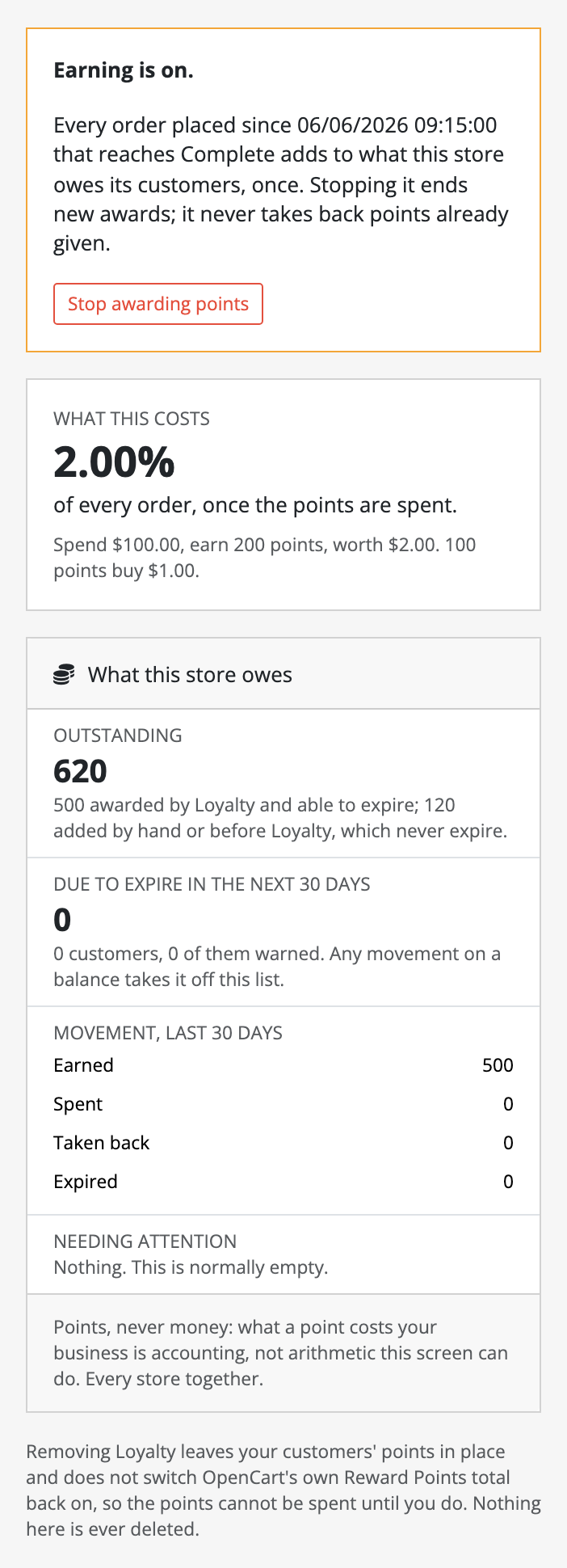
Points, never money
The panel shows points and never a money value. What points can buy is arithmetic you set with the exchange rate. What they cost your business is an accounting question, and Loyalty does not answer it for you.
The four blocks
Outstanding. Every point OpenCart holds for your customers, which is OpenCart's own sum of its reward table. It is split in two:
- points Loyalty awarded, which can expire if you switch expiry on;
- points added by hand on a customer's Reward Points tab, or before Loyalty was installed, which never expire.
This figure is recalculated every time the screen opens, and it is the one figure on the panel that has to read the whole of OpenCart's reward table. Loyalty does not store a copy of it, for the same reason it never stores a copy of a customer's balance: a copy is a second figure that can disagree with the first.
Due to expire in the next 30 days. The points that expire within 30 days if nothing moves on those balances, and how many customers they belong to. Of those customers, it also says how many have already been sent their warning email. A customer who has not been warned yet is counted only when their warning period also fits inside the 30 days, because nothing expires until the warning has gone and its period has run out. With expiry switched off, nothing is due.
Movement, last 30 days. What changed, in four lines. Earned covers orders, the welcome and birthday bonuses, and anything another extension awarded. Spent is points spent at checkout, less any spend returned when an order was voided. Taken back is reversals, and Expired is expiry.
Needing attention. Two kinds of row, both normally zero:
- Unfinished writes. Loyalty records its own row first and writes OpenCart's reward row second. If the request dies in between, the row stays unfinished and the hourly scheduled task writes OpenCart's row and completes it. The customer's balance does not move until that happens.
- Rows OpenCart deleted underneath Loyalty, for example with the Remove Reward button on an order. The balance is already right, because it is OpenCart's own sum; the row is kept as history.
The panel is the only place either kind is shown.
Per store, and the whole installation
Rates, limits and the expiry window are set for each store. Balances are not: a customer has one balance across every store. On a store's own screen the panel counts that store's customers. On the default store's screen it counts every store together.
Changing the exchange rate
When a save would raise the number of points it takes to buy one unit of currency, the screen asks you to confirm first. It names the effect in money, for example: the 412,600 points outstanding here currently buy €4,126.00 of goods; after this change they buy €2,063.00. Points already earned are not recalculated and no ledger row changes. You can go ahead; the screen only makes sure you know. This is the one place Loyalty prints points as money, and the money is your own exchange rate applied to the figure, not a valuation.
OpenCart's own Customer Reward Points report
OpenCart ships a Customer Reward Points Report under Reports. Loyalty leaves it alone. Loyalty writes every movement into OpenCart's reward table, so that report still lists Loyalty's points, but three of its behaviours are worth knowing before you rely on it:
- No. Orders and Total overstate. The report joins each reward row to its order. An order with more than one reward row is counted once per row, and its total is added once per row. Loyalty produces that on purpose: an order that earns and is then refunded has an award row and a reversal row, and an order paid partly in points has a spend row as well. The Customer Name and Reward Points columns are correct.
- The date filter changes what Reward Points means. With no dates set, Reward Points is each customer's balance. With a date range set, it becomes the points that moved in that period, under the same column heading.
- It drops rows whose customer no longer exists. The report's customer-group condition sits on a table it joined optionally, which makes that join compulsory in practice. A reward row whose customer was deleted drops out of the report entirely. Loyalty's Outstanding figure on the default store still counts it; nowhere else in the admin does.