Troubleshooting
If Review Requests will not open at all (a blank page, or a bounce back to the dashboard), that is an install problem, not a Review Requests one. See troubleshooting an install.
Whatever the symptom, Review Requests wrote down what it did and what it refused to do, in a file your own admin downloads in one click. See what Kyvero extensions log.
Everything else starts in the same place: the Before anything is sent checklist at the top of the Settings tab. It is nine lines and it answers "why has nothing gone out" before you go looking at your mail server.
Nothing has been sent
Read the checklist first. Six of its lines carry a fix and each names the screen to fix it on:
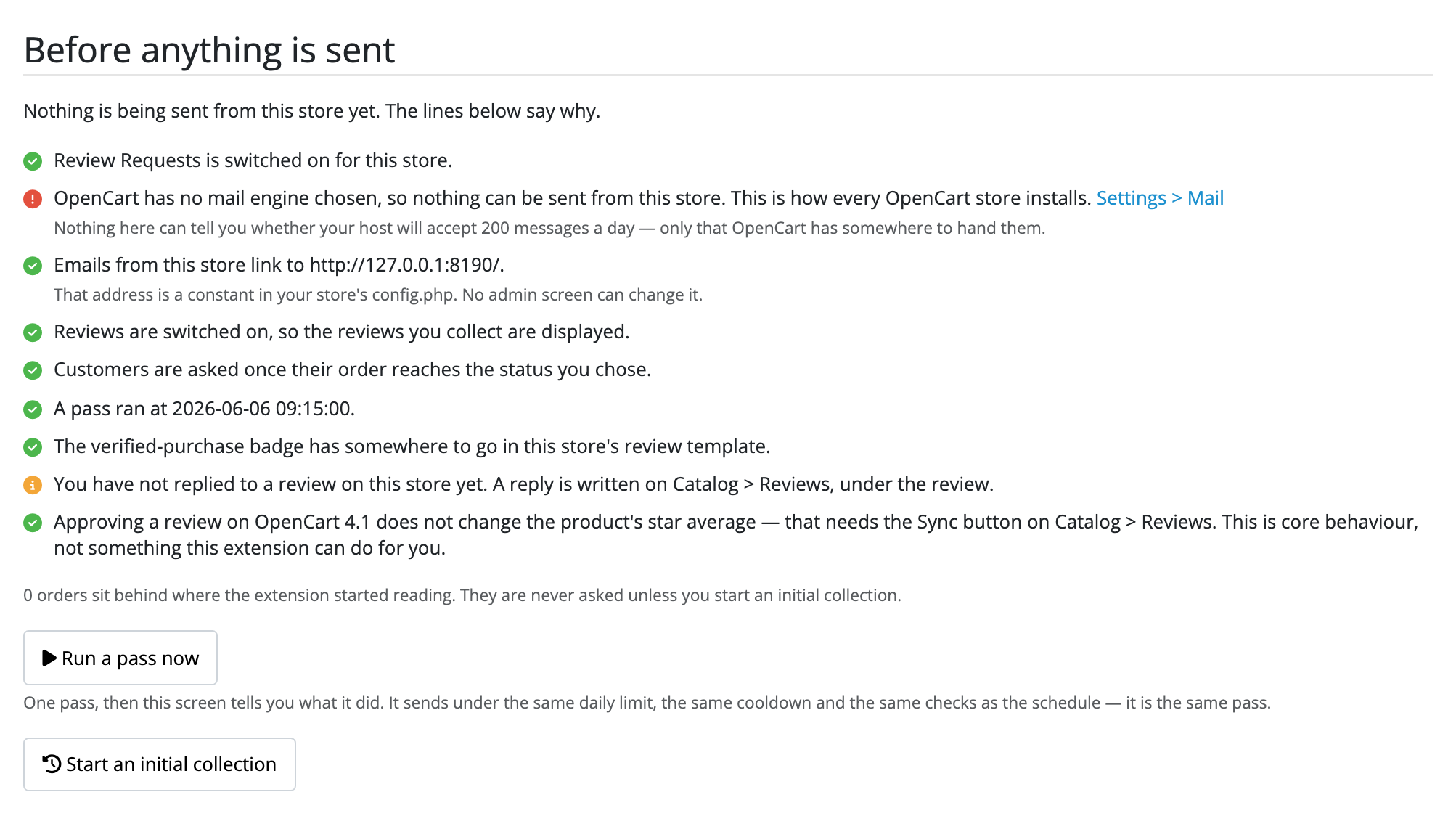
- Review Requests is switched off. Every update switches it off, and while it is off no pass sends anything: not the schedule, not Run a pass now, not the initial collection and not the command line. Switch Status on and save.
- No mail engine chosen. This is how every OpenCart store installs. Choose one under System → Settings → Mail.
- The store has no usable web address. Blank, or missing its
http://orhttps://. A store in that state is skipped rather than mailed, because every link in the email would be broken. Fix it on System → Settings → Stores; for the default store the address is a constant inconfig.phpand no admin screen can change it. - Reviews are switched off for the store, so nothing collected would be displayed. Nothing is sent until they are on.
- No order status is chosen. Nothing is ever picked up until you pick one.
- No pass has ever run. Something has to call OpenCart's
cron.phpfor a scheduled task to happen at all. If your host does not, add a crontab line, or use this extension's own command, which needs no scheduler:
php extension/review_requests/review_requests.php status
php extension/review_requests/review_requests.php pass
On OpenCart 4.1.0.4 the scheduled task cannot run at all. That release
shipped a cron.php that cannot load an autoloader, so every scheduled task on
the store dies inside OpenCart before any extension is reached, ours and
everybody else's. The settings screen says so, names your release, and stops
asking you about a schedule your store cannot run.
The fix is one crontab line of your own, which runs the same hourly pass through this extension's own door:
10 * * * * cd /path/to/store && php extension/review_requests/review_requests.php cron
See running the hourly pass yourself.
A customer never got their review request
Work out first whether a pass ran at all. Open the extension's settings tab and read Recent passes: a request that was never sent by a pass that never happened is a schedule problem, and the checklist above is where it is answered.
If passes are running and one particular request did not go out, find the order on the Requests tab and read the state on its row. Upcoming means the delay you set has not elapsed, Not asked and Unsubscribed both carry their reason, and Send failed carries what your mail engine said, verbatim, with a Resend button beside it.
On OpenCart 4.1.0.4 the commonest answer is the schedule, because there is no schedule: nothing is discovered and nothing is emailed until something drives a pass. Press Run a pass now to confirm that is all it is, then add the crontab line above so it stops happening.
If you have set sending hours, check them next. Recent passes says whether sending is open now, or closed and until when; outside the hours passes run and find orders and send nothing, and what waited goes out once the hours open. See sending hours.
If the checklist is all ticks and nothing has gone out, press Run a pass now and read what it says underneath. A pass reports what it found, sent, skipped and failed on; a pass that says Held ran and deliberately sent nothing because the store is not set up to send yet.
A review was approved and the stars did not move
Approving a review on OpenCart 4.1 does not change the product's star average. That needs the Sync button on Catalog → Reviews. This is core behaviour, not something this extension can do for you.
The Requests tab says the same thing beside your requests on 4.1 and up, and you can hide the note once you have read it. On 4.0.2.0 the average is computed from the review rows every time, so there is nothing to sync.
Requests are going out but no badge appears
Look at the badge line of the checklist. The badge is spliced into your store's review template at one anchor, and a template that anchor does not fit is left exactly as core rendered it, with no badge, no disclosure line and no error. The checklist answers for the template your store actually renders, including a theme override, which is why the storefront itself says nothing.
If the checklist says the badge has somewhere to go and you still see none, check that Show the verified-purchase badge is on, and that the review you are looking at was collected through a request rather than typed into the form on the product page.
A reply to a review does not show on the product page
Check three things, in this order:
- The review is approved. Core's review list shows approved reviews only, and the reply prints under its review.
- The reply line of the checklist. It appears once you have written a reply, and says whether your store's review template has a place for one. A theme that prints the review's text its own way gets no reply, silently; the reply is still saved and prints again once the template prints the text the way core does.
- There is a Reply box on the review form at all. If there is not, a modification has reshaped core's form, and this extension's log says the box was not added.
My inbox filled up during an initial collection
That is core's review alert, not this extension's. If you have ticked Review under System → Settings → Mail → Alert Mail, OpenCart emails you once per review submitted, and a collection over two thousand orders that goes well is a lot of reviews. Untick it while a large collection is running, or leave it and expect the post.
A request says Send failed
The row carries the error your mail engine gave, verbatim. Nothing retries it automatically: an error can arrive after the message has already been queued, so a retry can be a second email to somebody who has one. Fix the cause, then press Resend on the row.
A row that says Send interrupted is a different thing (a pass stopped between claiming the request and hearing back) and deliberately has no button, because nothing can tell whether that message went out.
A customer says they unsubscribed and got another email
Three things worth checking, in this order:
- When did the pass run? Suppression is checked at the moment an email would be sent, so a request found before they unsubscribed still reads Upcoming until a pass reaches it and marks it Unsubscribed. Nothing goes out in between.
- Which store? The list is per store. An address suppressed on one storefront is not suppressed on another.
- Is the address still on the list? The unsubscribe page offers Send me review requests again, and pressing it takes the address off. If it is not on the Suppression tab, that is what happened, or somebody removed it there.
You can add any address to the list by hand on the Suppression tab, which is what to do when somebody asks you in a support ticket rather than through the link.
A customer says the unsubscribe link does not work
If they reach a page saying the link is too old, that is not a failed opt-out. It is a link whose request the retention window has since emptied, so it no longer resolves to anybody. Anybody holding a link that old has had nothing from you since, because suppression only ever stops a future request and a future request carries its own live link. Add their address on the Suppression tab and tell them it is done.
The Needs a look count will not go down
It counts requests carrying a flag you have not acknowledged. Pressing Noted on a row takes it out of the count and leaves the flag on the row, because the flag records a fact and is not a task. What the three flags mean is in what a request can say.
Flags are refreshed by the same pass that sends, oldest first, so a flag you have just caused takes a pass or two to appear.
Emails are being accepted here and not arriving
Nothing inside OpenCart can see this. Your host almost certainly caps outbound mail well below the daily limit on the settings screen, and a store that hits that ceiling looks to this extension like a successful send. Deliverability (SPF, DKIM, the reputation of your sending domain) is the other half, and both are worth getting right before you start a large initial collection.