Product Feed
Product Feed writes the file Google, Meta and Microsoft Advertising read about your catalogue, and keeps writing it on a schedule so it does not go stale.
You create a feed (one channel, one store, one language), say which of your own values go into each field the channel asks for, place your categories against Google's taxonomy once, and choose how often it regenerates. Google and Meta then fetch the file from a URL Product Feed serves; the Microsoft Advertising file you download and upload yourself.
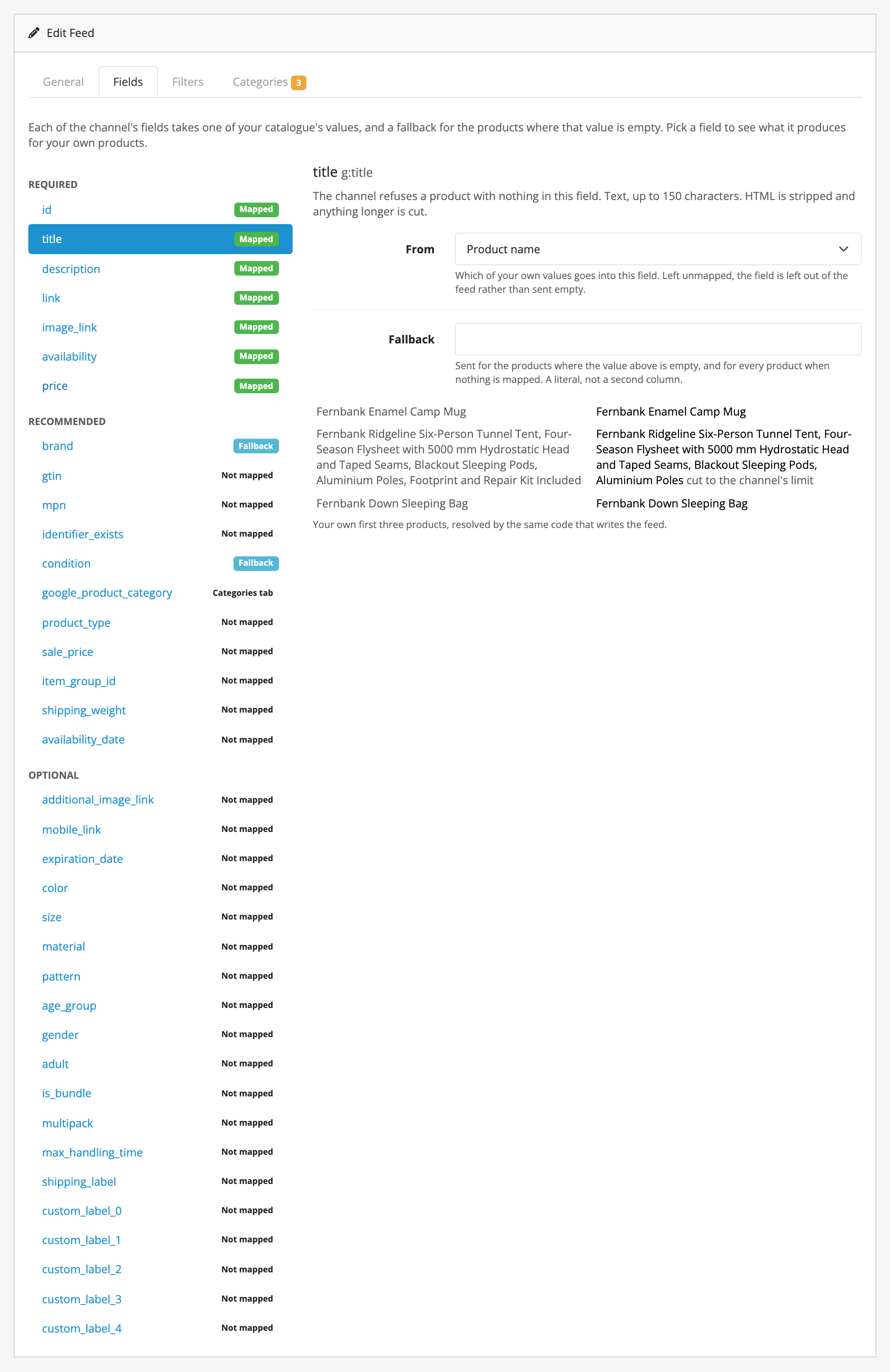
The main feature is the checking. Every field shows what it would produce for your own products, resolved by the same code that writes the feed, so a product with no barcode, a title that will be cut short or a price the format refuses is something you see on the screen rather than three days later inside Merchant Center.
Who it is for
- Store owners advertising an OpenCart catalogue on Google Shopping, Meta or Microsoft Advertising, who would rather not export a spreadsheet every week.
- Anyone who has had a channel reject a feed and had to work out which field, on which products, from a report written in the channel's own words.
- Stores selling in more than one language or more than one shop: a feed is per store and per language, and the category mapping is shared between the feeds that have those in common.
- Administrators who are not comfortable at a command line. Everything happens in the OpenCart admin, and there is a command line for the two cases that need one.
What it does today
- Generates feeds for Google Shopping, Meta and Microsoft Advertising, each from that channel's own published field set, in that channel's own format: RSS 2.0 XML for the first two, CSV for the third.
- Maps each channel field to one of your catalogue's values, with a fallback literal for the products where that value is empty, and shows you what both produce for your own first three products before you save.
- Proposes the mapping it can work out (a barcode column into
gtin, your category path intoproduct_type) with its reasoning, and applies none of it until you accept. - Marks a value the channel would truncate, refuse or ignore, at the moment you map it rather than after a channel has read it.
- Places your own categories against Google's own taxonomy, bundled with the extension, in one shared mapping every feed on that store and language reads. Unplaced categories inherit the nearest placed one above them, so mapping your top level produces a valid feed immediately.
- Proposes a Google category for each unplaced one from your category names, as proposals you accept or dismiss one at a time. This is local guesswork, with no API key, no account and no network call.
- Notices when a Google category you placed has been retired, and sends the nearest live one above it instead of a category Google no longer has.
- Filters which products reach a feed by category, brand, stock status and price range, and leaves out the categories, brands and individual products you name.
- Groups variant products under their master for Google and Meta, with each variant's colour or size taken from your own options.
- Sends the price including tax, at your store's own rates, and converts it into the feed's currency at your store's own exchange rate, when you ask it to.
- Regenerates on OpenCart's own scheduler (hourly, daily, weekly or monthly) with nothing to install on the server, and from the command line for exact times, deploy pipelines and stores whose OpenCart cannot run a scheduled task.
- Builds a feed in slices, so a catalogue of any size finishes rather than running into your host's time limit. Pressing Regenerate now again joins the run already going rather than starting a second one.
- Leaves the previous feed serving byte for byte when a run fails, so a bad night does not delist your catalogue.
- Leaves out a product it cannot represent rather than failing the whole run, and tells you how many it left out.
- Previews a feed as the channel's own fields before you generate it, so a mapping is checked here rather than by a rejection notice from Merchant Center.
- Serves each feed over its own tokenised URL, answering
a channel's conditional request with a
304rather than the whole file when nothing has changed, and gives you a new URL on one click when you want one. - Says on its own screen when your OpenCart release cannot run scheduled tasks, rather than leaving you to work out why nothing regenerated.
What it does not do
This list is here so that nobody buys Product Feed for something it will not do.
- No channels beyond those three. A channel's fields, tiers and formats come from its own published specification, so there is no way to type in a fourth. Beslist.nl, Idealo, Bol.com and the rest are not supported and are not scheduled.
- Nothing is pushed. There is no API integration and no FTP upload: the two channels that pull are given a URL, and the third is a file you upload. Product Feed never holds a channel credential of yours.
- One row per product. A variant product is a product of its own, so it gets its own row, grouped under its master's id; the master itself is in no group. Ordinary options have no row: a product with three sizes as an option is one item.
- Tax at your own store's address only, and no rates of its own. The tax-inclusive price is the one a guest of your storefront is charged, with no picker for another country's rate, and conversion uses the exchange rate your store's currency table holds. Product Feed fetches no rates.
- It does not tidy up after your catalogue. A price that reads
on requestis left out and the product with it, not turned into0.00. A field with nothing mapped is left out of the file rather than sent empty. - No rules, only filters. Four include-lists (categories, brands, stock statuses, a price range) and three leave-out lists (categories, brands, up to 1,000 products), with no conditions and no computed fields.
- The category suggestion is guesswork and it applies nothing. It reads your category names; it proposes; you accept. It has no idea what your products actually are.
- Google's taxonomy is the one bundled with the version you installed, in English and Dutch. A store language Google publishes no tree for is browsed in English, which does not affect what the feed sends. Refreshing the taxonomy means a new version of the extension.
- A schedule is as fine as your store's cron, and hourly is the finest cycle there is, because those are the four OpenCart's own scheduler understands. For an exact time, use the command line.
- Nothing is emailed. A failed run is on the feed list and in your store's error log, and a feed that has gone stale is called out, but nobody is told.
- A run cannot be cancelled. One that was walked away from is reclaimed fifteen minutes later.
- The list of products a whole run left out is not on a screen. You get the count. Preview marks the failing cell on any of the feed's first 25 products, and the Fields tab resolves one field at a time, but neither is the full list.
- A feed URL is not a login. It hands your catalogue's public product data to whoever holds the token, which is what makes it a feed.
For the exact boundaries (what a failed run leaves serving, what an update and a removal keep, what the feed URL will and will not hand out), read limits and guarantees before you buy.
Where to go next
- Requirements and install
- Quick start
- Guides
- Reference
- Limits and guarantees
- Troubleshooting
- Changelog
Whichever extension you bought, the shared pages apply to it too.