Product Search
Your storefront search finds more of the right products. Every word a shopper types has to match something, brand names and department names count as things to match against, the words your customers use are taught to mean the words your catalogue uses, misspellings are forgiven silently, and the products you choose lead the results.
Then it tells you what people searched for and what came back empty, which gives you a list of searches to fix.
It is for a store with a catalogue big enough that shoppers search it rather than browse it, and an owner who would rather read what customers type than guess.
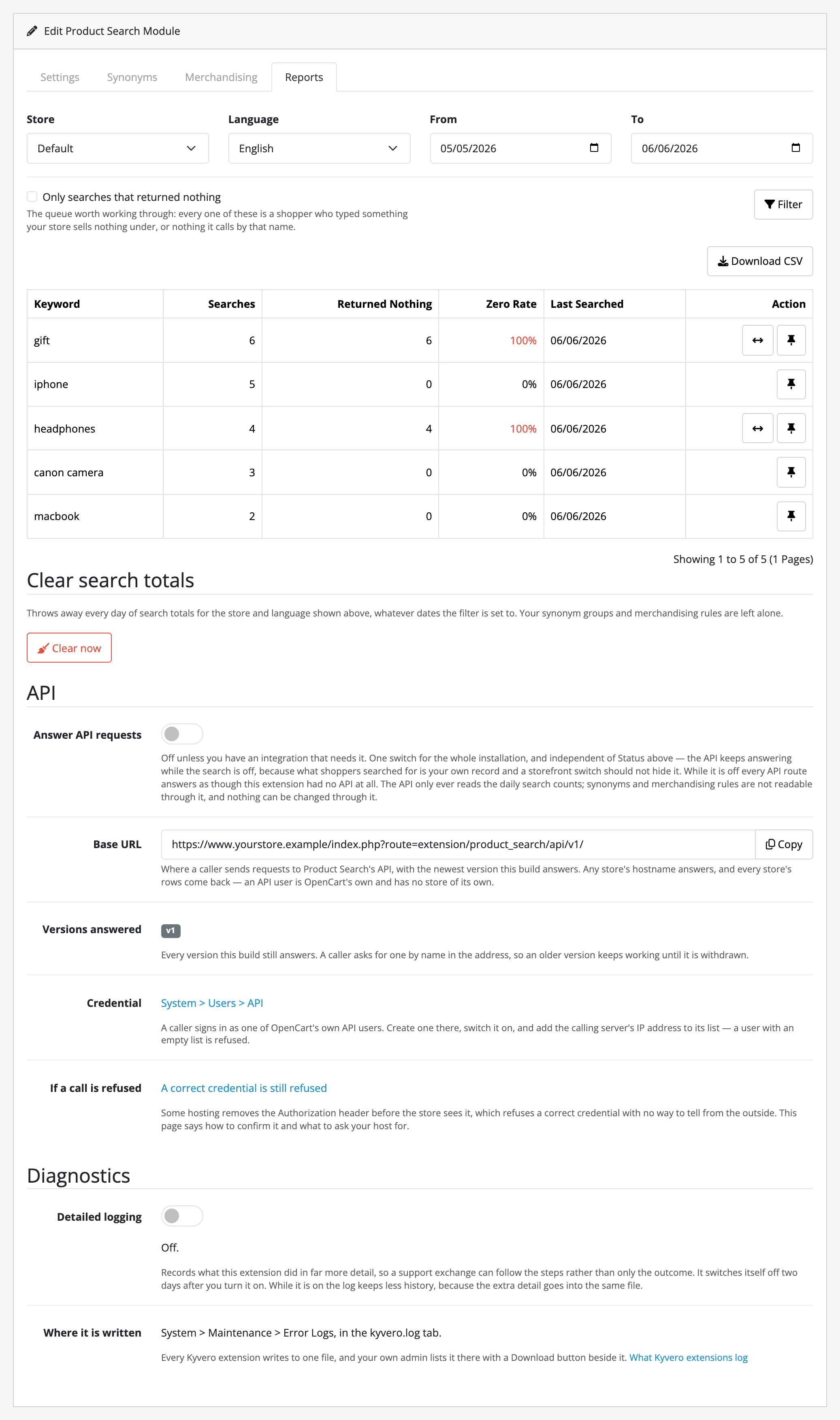
Those two 100% rows show what the report is for: ten shoppers typed something this store could not answer, and each row is one press away from the screen that answers it.
What it does
- Every word has to match.
red wool jumperreturns things that are red and wool and a jumper, matched across fields, so the brand can carry one word and the name another. - Brands and departments are searchable. A shopper who types your manufacturer's name, or the name of a category, gets the products. Stock OpenCart gives them nothing.
- Synonym groups you author: jumper, sweater, pullover stand in for each other, per language, whichever one the shopper knows.
- Misspellings are forgiven.
labtopfinds laptops, corrected against your own catalogue rather than a dictionary, and never against a product code. The shopper is not told. - Merchandising pins. Choose which products lead a given search, in your order, whether or not they would have matched it.
- A search report: what was typed, how often, and how often it came back with nothing, as daily totals per store and language, with no IP address, no customer and no session recorded. Each row links straight to the fix.
- No theme changes. No storefront markup, no JavaScript, no template edits. The results page is the one you already have.
What it does not do
This is the shorter list; read it first. Limits and guarantees states each of these precisely.
- It does not rank results better. There is no relevance weighting. Product Search finds a better set of products; the order within it is OpenCart's, with your pins in front.
- It adds nothing to your storefront. No autocomplete, no suggestions, no faceted filters, no "did you mean". Facets on search results come from Advanced Product Filters, a separate extension.
- On OpenCart 4.1.x your results get narrower. Core requires either word there; this requires both, at every release. Fewer results, and more searches that find nothing, which typo tolerance rescues and the report shows you.
- Parent categories do not match. A product filed only under Electronics ›
Laptops is not found by
electronics. - Pins stand down when a shopper sorts. Someone who sorts by price gets what they asked for.
- Synonyms and pins are per language, not per store. Every storefront in a multi-store install shares them; only the on/off switches and the counting are per store.
- The report holds no personal data. Daily keyword totals and nothing else, by construction rather than by a setting.
- Uninstalling leaves your data. Groups, rules and counters survive on purpose; removing them is something you do deliberately.
The rest of this section
- Requirements & install: what the store needs, and the steps to get Product Search running in it.
- Quick start: the shortest path from installed to useful.
- Guides: making a synonym group, pinning a product, reading the report, and fixing a search that returns nothing.
- Reference: the settings, the tables, the permission and the events.
- Limits & guarantees: exactly what Product Search promises, and where that promise stops.
- Troubleshooting: when it does not behave.
- Changelog: what changed in each release.
Whichever extension you bought, the shared pages apply to it too.