Troubleshooting
What goes wrong once Import/export is running, and what each message means. Import/export reports a refusal in one place, a red bar at the top of its own screen, and tries to name the field, the row or the value it could not make sense of.
If Import/export will not open at all (a blank page, or a bounce back to the dashboard), that is an install problem rather than an Import/export one. See troubleshooting an install.
Whatever the symptom, Import/export wrote down what it did and what it refused to do, in a file your own admin downloads in one click. See what Kyvero extensions log.
The source cannot be read
No source was given. Choose a file to upload, or give a URL or a server
path. Both fields were empty. If you did choose a file, it may have been
larger than your server's upload limit. PHP discards it silently, so Import/export
sees nothing arrive. Ask your host about upload_max_filesize and
post_max_size, or import from a URL instead.
The uploaded file could not be stored in …, so the import cannot be resumed later and was not started. The upload directory is not writable. Import/export keeps its own copy of the file because a job runs in slices across separate requests, and the slice that resumes it has to be able to read the source again.
Importing from a server path is not set up. Nobody has nominated the directory imports may be read from. Set Import directory on the server under Settings for this store, or upload the file instead. There is deliberately no default. See the security posture.
The source '…' is outside the directory Import/export is allowed to read imports
from. The path resolves somewhere other than under the nominated directory. A
.. segment and a symlink pointing out of it are the same refusal, on purpose.
Import/export fetches http and https sources and paths on this server. '…:' is
neither. Only http and https are spoken. file, ftp and the rest are
refused.
This server has no cURL support, so Import/export cannot fetch a source over HTTP. Download the file and upload it instead, or ask your host to enable cURL.
The source '…' answered with HTTP 404 rather than a file. Your supplier's
URL is wrong, has moved, or wants credentials. A protected feed takes them in
the URL: https://user:password@host/feed.csv.
The source '…' answered with an empty file, so there is nothing to import.
The server answered with nothing. This is usually a feed that has not been
generated yet. Check the date in the URL if it carries {date:…}.
The source '…' is on this server's own network, and Import/export only fetches public addresses. This is deliberate and cannot be overridden. If the file really is on your own network, put it in the import directory and give a path instead.
The source '…' could not be fetched: '…' does not resolve to an address from this server. This is DNS as your server sees it, not as your desk sees it. A hostname that works in your browser but not here is usually one your server cannot resolve at all.
The source '…' redirected more than 5 times without arriving at a file. Every hop is checked like the first, so a share link that bounces through a login page lands here. Use the direct download link.
The file is read, but not the way you meant
The source is empty: no header row was found. A CSV or spreadsheet whose first row is blank, or whose separator is not the one you chose. Try setting Separator explicitly rather than leaving it on Detect.
The source holds no array of records. Name the node that does. (JSON) or
The source holds no repeated element. Name the node that holds the
records. (XML) Fill in Record node, something like products/product.
The source has no node named '…'. The Record node you gave is not in the file. Leave it empty to let Import/export find it.
The source ends part-way through a record, or is not readable as JSON. The file is truncated or malformed, often a download that was cut off. Fetch it again.
The source could not be opened as a workbook, or The workbook holds no
worksheet. The .xlsx or .ods is damaged, or is not really a spreadsheet.
Open it and save it again, or export it as CSV.
The source has no column named '…'. A mapping (usually a profile running on a schedule or from the command line) names a column this file does not have. Your supplier renamed a column. Open the profile and rebind it on the Columns tab. On the screen you see this coming instead: a mapping opened against a file that has lost a column names the missing ones at the top of the mapping card, before you plan anything.
Accented characters come through wrong. Set Encoding to whatever the
file is, such as ISO-8859-1. Leave it empty otherwise.
The plan will not start
These are all caught before a job exists, so nothing has been read and nothing written.
Nothing is mapped, so this import would write nothing. Bind at least one column on the Columns tab.
Nothing is mapped to 'model', so no row can be matched to a record. Whatever you chose under Match existing records on has to be bound to a column, or nothing can be matched to a record.
Nothing is mapped to …, which a product cannot be created without. Map it to a column, or give it a constant value on the Constants and rules tab. The fields reference marks which fields each kind of record requires.
'…' is mapped, but no table this import writes has a column called that. A field name that was valid on another store, or an Extra tables entry whose table is not there. Check the table name and the key column.
This job disables the records its source no longer carries, but this store has no status field to disable them with. That kind of record has nothing to disable. Choose Delete them, or leave them alone.
This store has no manufacturer called '…', so the import cannot write it. Create it first, or name it by identifier as '#12'. Names are resolved against what your store has, rather than created from a spelling mistake in a spreadsheet. Categories are the exception: levels the store does not have are created as the import runs.
Import/export job … was stopped before it planned anything: its source holds … rows, and this job requires at least …. The Refuse the file below floor did its job. A supplier export that failed halfway is a file of valid rows, far too few of them. Look at the file before lowering the floor.
Rows were rejected
A rejected row is counted under Rejected and listed with its row number, the field, and the value your file held, so you can fix it in the source. The messages are:
| Message | What to do |
|---|---|
is not a number / is not a whole number |
A price reading on request, or a quantity with a unit on it. Strip it with a transformation, or fix the file. |
is not a yes or a no |
A status column holding something other than a yes or a no. lookup maps a supplier's own codes onto one. |
is not a date |
Use the date transformation with read as set, which is how 31/12/2024 is told apart from 12/31/2024. |
is longer than N characters |
Your store's own column length. truncate cuts it down, if truncating is what you want. |
is empty, so the row matches nothing |
The column you match on is blank on that row. |
could not be fetched, and this job skips a record whose picture is missing |
The image reference resolved to nothing, and If an image cannot be fetched is set to skip the record. |
is not valid UTF-8 |
A CSV row holding bytes that are not UTF-8. Save the file as UTF-8, or set Encoding to what it is. |
has after values of N bytes, more than the 65535 a plan can store |
One row carries more text than a plan holds for a record. Shorten the long field in the file. |
Import/export never coerces a value. A price of abc is reported rather than
turned into 0.00.
Apply will not run
Import/export job … cannot be applied until its anomalies are acknowledged. Read them under Worth a look before you apply and press Acknowledge. They are the changes that usually mean something went wrong upstream, and you can tune the thresholds per job.
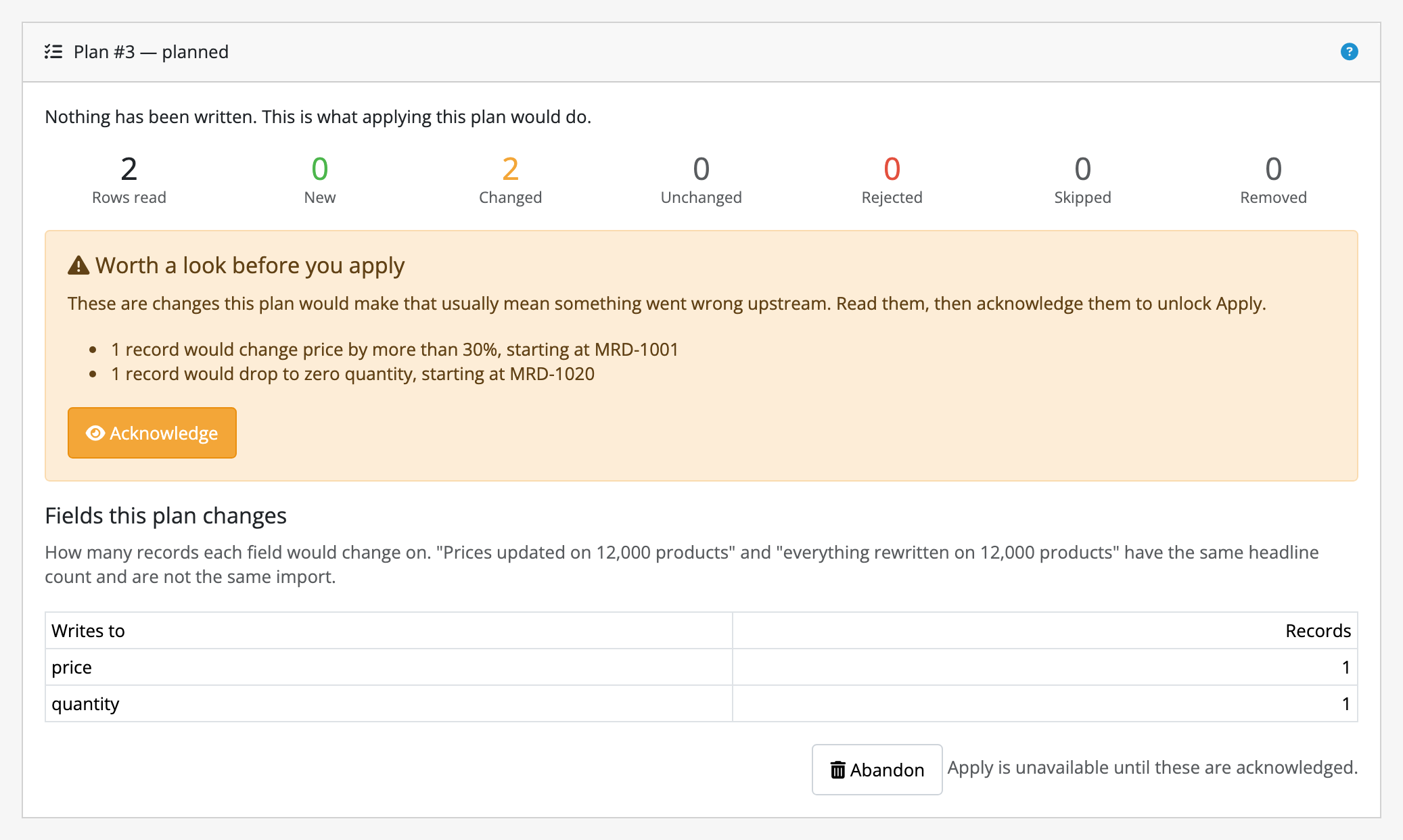
Import/export job … was not applied: the catalog has changed since the plan was made … Nothing has been written. Plan the import again to see what it would change now. Somebody edited a record, or another import ran, between the plan and the apply. Import/export compares per field, so a quantity somebody adjusted is not in the way of a plan that only writes prices. This is conflict detection working. Plan again and read the new preview. See conflict detection.
Import/export job … is …, and only a reviewed plan can be applied. The job has already been applied, was abandoned, or is still running. Reopen it from Past jobs to see where it got to.
A job looks stuck
Waiting for another import on the same records to finish: job #… Two jobs never interleave on the same kind of record. It starts when the other one finishes.
The progress bar has stopped moving. A job moves itself along while the page is open. If you navigated away, press Continue. The job keeps its place, and nothing was lost. A large slice on a slow host can take a while; Go easy on the server, under Settings for this store, makes the slices smaller.
Import/export job … is … but has no phase to run, so it cannot be resumed. The job has ended, one way or another. Past jobs says how.
Stop cancels a running job. A cancelled plan wrote nothing. A cancelled apply wrote less than the plan named and journalled every record of it, so it is still fully reversible.
Rollback will not run, or left records alone
Import/export job … can no longer be rolled back: its plan and journal have been purged. Either the retention window came round, or somebody pressed Clear now. The job stays in the history after it can no longer be reversed. See the retention window.
Import/export job … is …, and only an applied job can be rolled back. A plan that was never applied has nothing to undo; Abandon throws it away instead.
Edited since the import ran, so rollback left it alone. Rollback will not overwrite somebody else's later work in the name of undoing yours. You get the list of what it declined to touch, and you decide what to do by hand. This is also what happens when two Import/export jobs wrote the same field in sequence and you roll the first one back.
A scheduled run did not happen
In this order:
- Are you on OpenCart 4.1.0.4? This comes first because it is the only cause with no symptom of its own: nothing errors, nothing is logged, and Automatic runs stays empty rather than showing a failure. That release has a fault in OpenCart itself that stops every scheduled task on the store, ours and everybody else's, and no extension can repair it. Import/export says so in a banner across the top of its own screen, and stops promising a next run beside each profile. The fix is a line in your server's own crontab:
10 * * * * cd /path/to/store && php extension/preflight/preflight.php cron
That runs both passes exactly as the store's scheduler would. See
running the scheduled passes yourself.
Nothing else on this list applies on that release.
2. Is your store's cron running? Import/export registers its two jobs on
OpenCart's own scheduler, listed under Extensions → Cron Jobs. If your
host is not calling OpenCart's cron.php, nothing scheduled runs, neither the
feeds nor the purge. The same crontab line above works around that on any
release.
3. Is the schedule switched on? A cycle without Switched on ticked does
nothing, on purpose.
4. Read the Automatic runs tab. Every attempt is there, including the one
that never became a job because a supplier's server did not answer, with the
reason.
5. Check when it was last due. A schedule is only as exact as the cron: an
hourly profile on a store whose cron fires twice a day runs twice a day. For
exact times, use
the command-line runner.
A run held on anomalies is not a failure. It planned the import, wrote nothing, and emailed your store's own address. The plan is waiting on Import/export's screen for you to read and apply or abandon.
If a run failed and no email arrived, your store has no mail engine configured or its SMTP server refused the connection. Mail is not allowed to break the cron, so the run and its error are still in Automatic runs.
Text generation
No AI provider is configured for this store, or No … key is configured for this store, so Import/export cannot generate text. Set Text generation provider and Provider API key under Settings for this store. After an update the key is deliberately asked for again. See what an update keeps.
… answered without any text in it, so there is nothing to write. Check that the model name is one your account can use. Usually Model to ask naming a model your account has no access to. Leave it empty for the provider's default.
… refused the request with HTTP 401. The key is wrong, or has been revoked. Type a new one. The field never shows the old one back.
… could not be reached, or This server has no cURL support, so Import/export cannot reach …. A network problem between your server and the provider.
Some records came out with the field untouched. The job's Never make more than cap was spent. The remaining records are planned with those fields exactly as they were, which is what the Unchanged count then shows. A plan that stops generating is not a plan that failed.
Export and download
The file job … exported is no longer on the server. Run the export again. A purge deleted it, or somebody cleared the directory. Exports are removed with plans and journals when the retention window comes round.
'…' is inside the store's image directory, which is served to the public, so Import/export will not write exports there. Everything under the image directory is a public URL, and an export is your whole catalogue in one file. Name a directory outside it, or leave Write exports to empty and use the Download button.
Import/export could not create the directory '…'. Check that its parent is writable. Make the parent directory writable.
This export is filtered or sorted on '…', which is not a field a … has. Stock and the model belong to a product; a coupon has neither. Clear that filter.
'…' is a table of rows rather than one value, so an export cannot be ordered by it. A product's categories or images are many rows written into one cell. Sort on a column of the record's own row instead.
This store has no manufacturer called '…', so an export cannot be filtered on it. A filter is not an instruction to create anything, so a name your store does not have is a typo rather than an empty file.
'…' and '…' would both be exported as '…'. Give each field a column of its own. Two fields are ticked that write the same column heading.
No fields are selected, so this export would write nothing. Tick some.
The feed URL answers 404
Every problem with a feed request gets the same plain 404, on purpose. A URL that distinguished them would answer questions for whoever was guessing. Check, in this order:
- Feed secret is set under Settings for this store, and the
secret=in the URL matches it exactly. - The
entity=names a kind of record you have actually finished an export of. The feed serves the last finished export; it never makes one. - The
entity=is notorder,customerorcoupon. Those three are never served over the feed whatever secret you present. See the security posture. Download them from the job history instead. - That export has not been purged. A feed nobody fetched for longer than your retention window is serving nothing.
Pictures
The image '…' could not be staged: '…' is not writable, or could not be installed: '…' is not writable. Your store's image directory, or the folder named under Put images in, is not writable by the web server.
The image '…' arrived empty, so there is nothing to install. The URL answered with a zero-byte file.
Image references that fetched nothing in the anomaly list means the plan found references it could not resolve. They show in the preview before they reach the storefront. Check the Cut this out of image paths rewrite rules if your supplier's paths need adjusting.
Importing a profile
That file is not a Import/export profile. It is not a .preflight.json file,
or it has been edited into something unreadable.
That profile was written by a later version of Import/export. Update this store's copy of Import/export first.
That profile has no name. A profile is found by name, so it has to have one.
Still stuck
Tell us the message, the kind of record, and what the file looks like. See support.