Product Bundles
Sell a starter kit, a gift set or a camera-plus-lens package as one thing: a bundle made of existing products, priced as a whole, that decrements each component's stock when it sells.
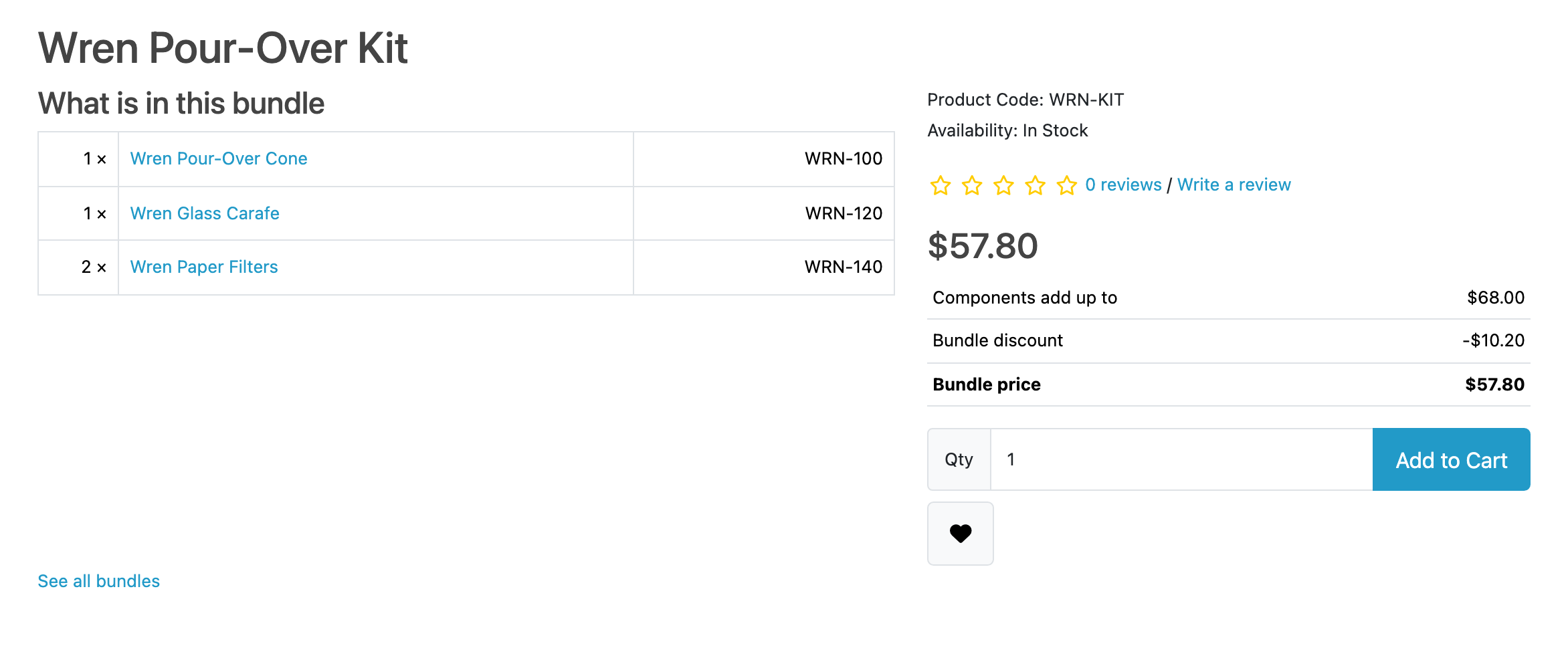
You build a bundle out of products you already stock, give it one price, and it gets its own page in your storefront and its own row in your catalogue. A shopper adds it to their cart as a single line. When it sells, every component's stock comes down by what was in the box: a kit holding three straps takes three straps.
Who it is for
A store that already sells the parts and wants to sell them together, without keeping a second set of stock figures by hand. If you have ever built a "kit" product and then found yourself correcting its stock every time one of its parts sold, Product Bundles does that job for you.
What it does
- One price for the whole box, set as an amount or worked out from the components, with what the shopper saves shown on the page.
- Stock derived live from the components. A bundle has no counter of its own, so it can never disagree with the products it is made of. The same component in two bundles in one cart is one demand on one figure.
- Components can carry options. Where a component has a size, a colour or an upgrade, the bundle page asks for it, and the price quoted includes what that choice costs. The cart is charged the number the page quoted.
- Shipping and reward points are quoted on what is in the box, not on the product the bundle hangs off.
- A broken bundle is refused, not sold. Take a component off sale and the cart says which line is the problem, the customer cannot check out holding it, and your bundle list badges it so you hear about it first.
- It uses the screens you already have. Bundles get OpenCart's own SEO URLs, reviews, wishlist, and rows in What's Viewed and Products Purchased.
- Bundles on a component's own page. A layout module you place at Design → Layouts shows Bundles with this product on a product's page, and a shelf of your bundles on any other layout.
- Components sold, counted. Reports → Bundle components sold gives the units of each product that left inside a bundle, with a CSV download. Units only, never money.
- Downloadable components work. The buyer gets the file from Account → Downloads like any digital product, which also means a bundle holding one cannot be bought as a guest.
- Order pages show what shipped, frozen at the moment of the order, and so do Returns Portal's screens if you also run it.
What it does not do
This list is here so that nobody buys Product Bundles for something it will not do. Limits and guarantees states each one in full.
- It needs OpenCart 4.1.0.1 or newer. This is the only extension sold here that does not go back to 4.0.2.0, and the reason is a boundary rather than a preference. See Requirements.
- You cannot compose a bundle order from the admin. The order editor refuses a bundle line rather than mangling what the shopper configured.
- A component cannot be returned or refunded on its own, because the order never recorded what one component cost.
- A coupon naming a product inside a bundle does not apply to the bundle, and a product special or discount set on a bundle's carrier is lost.
- A bundle cannot contain a subscription product or another bundle. The bundle form refuses to save either.
- Nothing restocks on a return, which is OpenCart's own behaviour.
- It ships in English only. Your bundle names and descriptions are your own, per language, as they always were.
The rest of this section
- Requirements & install: what the store needs, and the steps to get Product Bundles running in it.
- Quick start: the shortest path from installed to useful.
- Guides: task-shaped walkthroughs.
- Reference: the lists of fields, options and settings.
- Limits & guarantees: exactly what Product Bundles promises, and where that promise stops.
- Troubleshooting: when it does not behave.
- Changelog: what changed in each release.
Whichever extension you bought, the shared pages apply to it too.