Pre-Order
Sell what has not arrived yet. Mark a product, or one option value of one, as a pre-order, with the date you expect it, and either charge in full at checkout or take the order now and ask for the money when the stock lands.
A shopper sees the terms before they click: a panel above the add-to-cart button, a line under the price on every product card in the store, and a button that says Pre-Order. When the stock arrives, saving the product's quantity is the whole trigger: the lines that were waiting are marked ready, and the customer is emailed a link that opens their order at the price they placed it at.
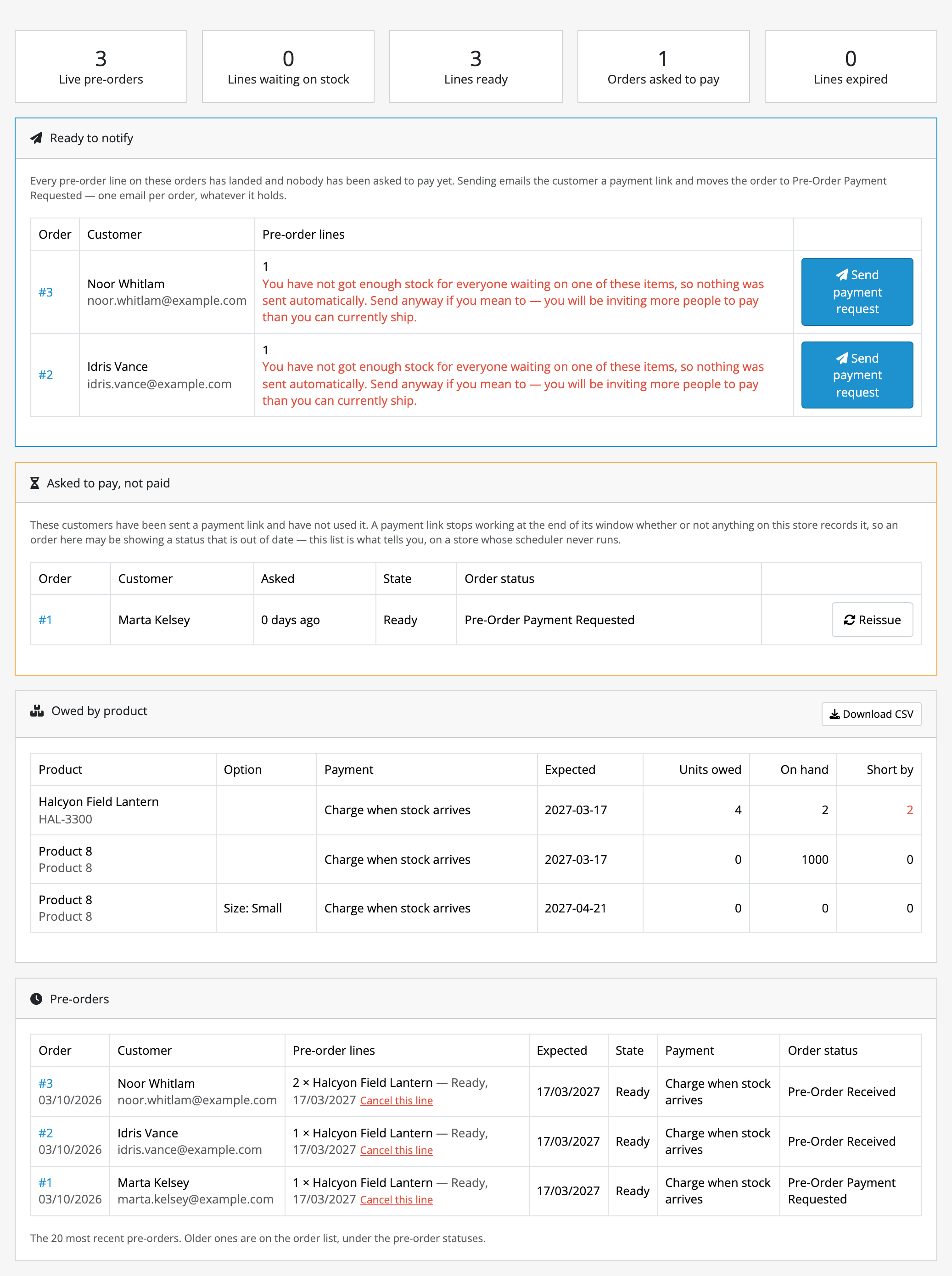
It is for a store that knows what it is getting and when: a restock with a date, a new line taking orders before it lands, a supplier who ships on the 14th. One screen says what is owed, what has arrived, who has been asked for money and who has not paid.
What it does
- Two ways to take the money. Charge in full at checkout, through your own payment methods; or take the order charging nothing and email a payment link once the stock lands. Per product, or per option value.
- Per option value. One size a pre-order and the rest on the shelf, or the reverse. A line takes the latest date of what the shopper chose, and defers if any part of it defers.
- Tells the shopper before the basket. The panel, the button wording and the card line are all yours to reword, and the shipped wording already says the two things that cause arguments later.
- Releases itself. Saving a product's quantity releases the lines waiting on it and asks the orders whose lines have all landed. There is nothing to remember and no screen to visit.
- Stands down when you are short. If what landed does not cover everybody waiting, nothing is emailed: the orders are held with the number in front of you, and sending anyway is a button.
- A payment window you set. One reminder halfway through, expiry at the end, and a link that is dead at the end of its window whether or not your store's scheduler ever ran.
- Overrides where you need them. Release a line early, cancel one, or reissue a link for the customer who says nothing arrived.
- Survives an order edit. OpenCart's order editor rebuilds every line of an order; Pre-Order rebuilds its own rows against them, keeping what the customer was already told.
What it does not do
- It does not ration stock. No allocation, no queue, no first-come cut-off. Who gets the units when you are short is your decision, made with the number on screen.
- A deferred pre-order cannot share a basket with in-stock items. One order carries one payment method, and a part-paid order is not a thing this can represent. The shopper is told on the basket page. Charge-in-full pre-orders have no such restriction.
- It does not touch money. Cancelling a line or a window running out emails nobody and refunds nothing.
- It does not always name its own order status. A charge-in-full pre-order, and a pre-order created from the admin order editor, both carry your store's normal status. The Pre-Orders screen is the record; the status is a label.
- Option-level pre-orders from the admin order editor work on the OpenCart 4.0.2 releases only, and only for options OpenCart gives a stock quantity of their own.
- OpenCart's own scheduler cannot send the reminder on 4.1.0.4, where a fault in OpenCart itself kills every scheduled task on the store. On that release you run the sweep from a web address or a command instead; set neither up and nothing is chased.
- It cannot promise an email arrived. It hands two messages to your store's mail engine, and Reissue is what you press when one does not land.
- It does not delete your data, including when you uninstall it. The tables, the statuses and every live payment link stay.
All of that is written out on limits and guarantees. Read it before buying rather than after.
The rest of this section
- Requirements & install: what the store needs, and the steps to get Pre-Order running in it.
- Quick start: the shortest path from installed to useful.
- Guides: task-shaped walkthroughs.
- Reference: the lists of settings, states and where things live.
- Limits & guarantees: exactly what Pre-Order promises, and where that promise stops.
- Troubleshooting: when it does not behave.
- Changelog: what changed in each release.
Whichever extension you bought, the shared pages apply to it too.