Limits and guarantees
Read this page before buying. It states what Delivery Date promises and, at greater length because that half costs money to discover late, where each promise stops.
At a glance
| If you are asking | The short answer |
|---|---|
| Can an order be moved to a day earlier than the customer chose? | No. A day that cannot be kept moves forward, or the order is marked as having no day and flagged for you. More |
| Can a shipping method's calendar open a closed date? | No. It can open a weekday the store calendar closes, but a closed date closes every calendar. More |
| Does a cap count weight, volume or items? | No. A cap is a number of orders, and lowering one below what is booked un-books nobody. More |
| Can I move orders around on the day sheet? | No. The sheet is read-only; one order's day is changed on its own order page, never onto a closed date, and the customer is not told for you. More |
| Does the day sheet cover every shopfront? | No. Sales → Delivery Days shows the default shopfront's orders only. More |
| Can Saturday delivery cost more, or depend on the postcode? | No. Delivery Date never touches the order total, and a calendar is narrowed only by shipping method and customer group. More |
| Does it need the store's scheduled tasks running? | No. It registers no cron entry. More |
| Can my carrier's or warehouse's system read the delivery days? | Yes, once you switch the API on: each order's day, window and whether the promise still stands, and what changed since a moment. It cannot move one. More |
| Does uninstalling delete my calendars or bookings? | No. Uninstalling removes nothing but its event registrations; bookings go only from the remove-everything screen. More |
| Does it work on OpenCart 4.1.0.1? | Not for guests: OpenCart's own guest checkout is broken there, so a guest never reaches the picker. More |
The one guarantee
We will never deliver earlier than the day you chose. If we cannot do the day you chose, we move you to the next day we can. If there is no such day, we contact you.
Everything below is the detail behind that sentence.
A day can stop being deliverable between the moment a shopper picks it and the moment their payment lands: somebody else takes the last place in the window, you close the date, you lower a cap. When that happens Delivery Date looks forward: the same window on the same day if it is still there, otherwise the earliest window on or after the day the customer chose. Never the nearest. A customer who picked Thursday may be out on Wednesday, so an early delivery is a missed delivery, a redelivery and a phone call, where a late one is a delay.
Where the calendar has nothing left to offer at all, the order is marked as having no delivery day rather than being given one nobody promised. It lands in a red banner on every day of the planner and carries the Awaiting Delivery Date status, so you can find it and ring the customer.
The one place an earlier day is ever shown is at checkout, before the order exists, while the shopper is looking at it: if the only date left is earlier than the one they picked, the picker says so in red and states that it is earlier than the day they chose. They can pick again, or leave. Once the order is placed, nothing moves it earlier; the same fallback at that point marks the order as unscheduled instead.
What the customer sees when their date moves
They are told in three places, and the wording depends on what happened, because a window swap is not a moved delivery:
-
On the checkout page, as a notice under the order summary, whenever the date is re-resolved while they are there.
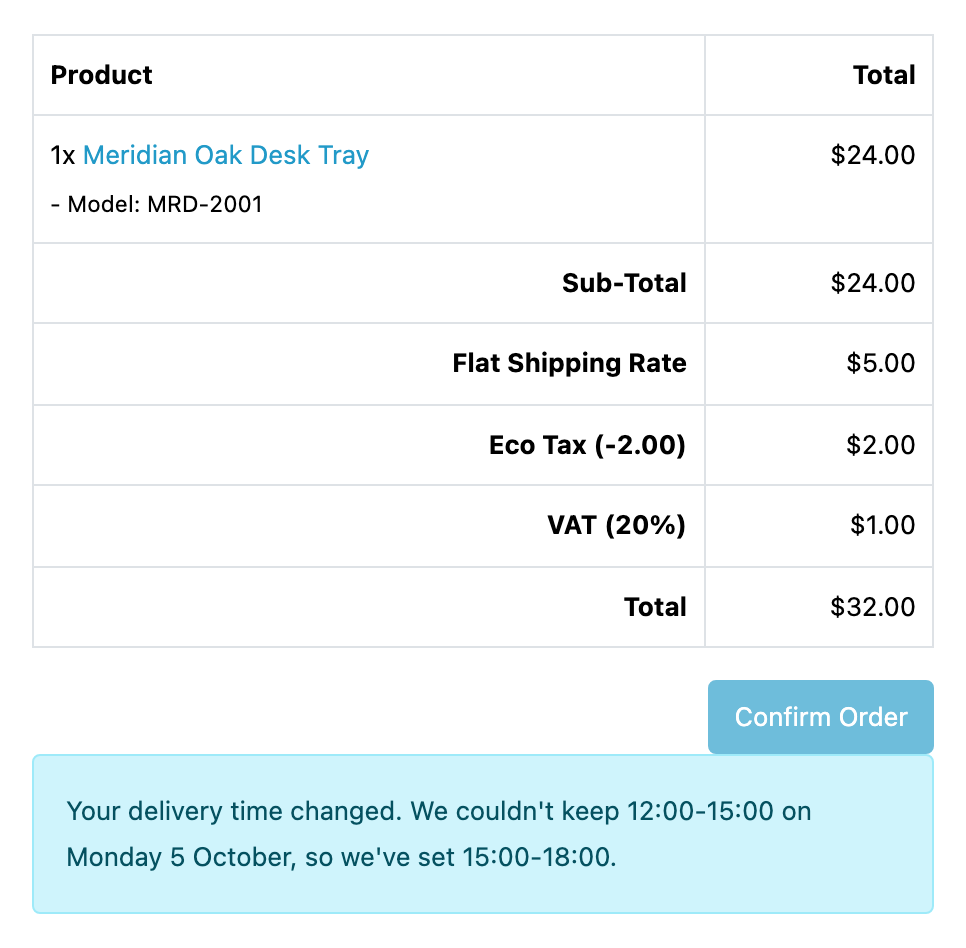 - In the confirmation email, under the shipping method, in the language they
ordered in.
- On their own order page, for the life of the order, so a customer who never
opened the email still learns the date is not the one they chose.
- In the confirmation email, under the shipping method, in the language they
ordered in.
- On their own order page, for the life of the order, so a customer who never
opened the email still learns the date is not the one they chose.
Where the move happened after they stopped looking, a line is appended to the order history saying so in plain customer-facing words, and the order is flagged with Awaiting Delivery Date.
That status is customer-facing
Awaiting Delivery Date appears in the customer's own order history, not only in your admin. The history line beneath it is written as a sentence to the customer. If you rename the status, or point Delivery Date at a status of your own under Flag a moved delivery as, read the new name as copy your customers will read.
What composes with what
A shipping method can have a calendar of its own, and how the two combine is the thing most often reported as a bug:
| Days and slots | The method's own replace the store calendar's, whole, unless it is set to use the store calendar's |
| Closed dates | Both apply, always |
| Preparation time | The longer of the two |
| Cut-off | The earlier of the two set; blank takes the store's |
| Horizon | The nearer of the two |
| Customer group | A method calendar limited to groups speaks for those groups; everyone else gets the store calendar |
So a shipping method can open a day the store calendar closes (that is how "Pickup runs on Saturdays" is configured), but nothing can open a day a closed date closes. A closure means the store is shut, and no carrier can reopen it.
A method calendar with no group ticked under Offered to speaks for every group, which is what every calendar did before the box existed. The group only decides which calendar composes with the store's; it never picks a calendar on its own, and the store calendar itself cannot be limited, because it is what everybody falls to. A shopper is judged by the group the order will carry at checkout, and a booking is confirmed against the group recorded on the order, so a customer moved to another group in between keeps the calendar they were offered. A ticked group that you later delete in OpenCart matches nobody. If every group a calendar was limited to has been deleted, that calendar speaks for nobody and every shopper on its methods gets the store calendar, until you save it again, which drops the groups that no longer exist.
Inheritance is per calendar, never per field. A method either takes the store calendar's days and slots whole, or declares its own. It cannot declare its own weekdays and inherit the slots.
How the days are counted
- The horizon counts calendar days from today, holidays and closures included. "Book up to 30 days ahead" is a promise about the customer's calendar, not about your working week.
- Preparation counts delivery days by default, over the store calendar's own week. The choice is Count preparation in on the settings screen, and it is store-wide. It is never set per shipping method, because preparation is something you do, and picking a slower carrier should not make an item take longer to make.
- Preparation is a maximum, never a sum. A store needing one day in general and a product needing five needs five, not six. Two products needing three and five days need five, not eight.
- The cut-off does exactly one thing: it decides which day's batch an order is in. It only applies on days you deliver on, so a Saturday order is Monday's work whether it arrives at 10:00 or at 16:00.
The one daylight-saving edge
The cut-off is compared as the time on the wall. On the spring-forward day that is safe: a cut-off inside the hour that does not exist reads as passed. On the autumn fall-back day, a cut-off inside the hour that happens twice passes, then un-passes for the repeated hour, then passes again.
Do not set a cut-off between 01:00 and 03:00
For one hour, once a year, orders in that window would join the wrong day's batch. Any cut-off outside 01:00 to 03:00 is unaffected, and no realistic cut-off is inside it.
Everything else about delivery dates is worked out in the timezone set in System → Settings → Local, which the store calendar screen prints back to you along with the current time there.
What capacity does and does not count
A cap is a number of orders, per window, per day. It is not a weight, a volume, an item count or a number of vans, and Delivery Date has no way to express "four orders unless one of them is a sofa".
- A window somebody else is in checkout with is not offered to you. The count the picker uses includes other shoppers' live holds, so it is deliberately pessimistic: a window can come back when a checkout is abandoned. Holds expire by themselves after the number of minutes set under Hold a slot for; nothing has to clean up after an abandoned basket. Set it to 0 and a window is not held for anybody until their order is placed.
- The count that decides who gets the window is confirmed orders only, and first to confirm wins. A firm booking is never displaced. A payment that lands late for an abandoned order queues behind whoever took the window in the meantime.
- A full window is struck through, not hidden, so a busy three-window day does not read as a quiet one-window day. A day on which every window is full drops out of the list.
- Lowering a cap below what is already booked un-books nobody. The planner
shows the real figure,
6/4with a 2 over badge. - An uncapped window never shows a denominator. It shows a count and no limit.
Which orders stop taking up a place is yours to set under Give the slot back on. The default is core's Canceled, Denied, Canceled Reversal, Failed, Refunded, Reversed, Chargeback, Expired and Voided statuses. Pending is deliberately not among them: an order nobody has paid for yet is still coming, and it still needs a place on the van.
The planner is read-only
Sales → Delivery Days shows you the week's occupancy and the day's sheet, prints the sheet, and exports the day as CSV. That is all it does.
You cannot move a booked order to another day or another window from it, drag anything, tick anything, or change an order's status from it. The only link off the screen is the order id, into core's own order page, for a user whose group may open that page; that is where a booking is changed. The control is absent from the planner on purpose; a checkbox would promise a bulk action.
A firm booking is reassigned on the order page. The Delivery Day block
there carries a Change button for a user whose group has modify on
extension/delivery_date/sale/planner, and for nobody else. access alone still
reads the sheet and sees no button. It picks a day and one of the windows the
order's own calendar offers, and it works on an order with no delivery day too,
which is how an order in the planner's red banner gets one. What it will and
will not do:
- Only a firm booking. An order whose checkout has not finished still belongs to that checkout, and has no button.
- Not a day that has passed, and never a closed date. A closure means the store is shut, for you as much as for the shopper. Reopen the date on the calendar first if the store is in fact open.
- Only a window that calendar offers on that weekday. Preparation time, the cut-off and the horizon are not applied: those are the shopper's rules about what can be promised, and you know whether the order is ready.
- A full window is refused, naming the count (Saturday Morning is full, 4 of 4), unless you tick Book it even if the window is full. The planner then shows the window over its cap, the way it shows a lowered cap.
- The customer is not told. No email goes and no history line is written. Add an order history line with Notify ticked, in your own words, and change the order status there if it still reads Awaiting Delivery Date.
- The booking keeps the new day only. A reassignment does not read as a moved delivery, and the order keeps its place in the queue for the window it is in. Unless the day was already moved when it firmed, the day the customer picked is not kept on the booking: it survives only in the extension's diary line for the reassignment, which keeps the most recent 1 MiB of entries. Note it in an order history line if you need it later.
Afterwards the planner, the order list, the printed invoice and shipping list and the customer's own order page all show the new day.
The sheet shows the order id, the customer's name, their city and postcode,
their phone number, the item count, the status, their delivery instructions, and
was Sat 22 Aug where the booking moved. It does not show the order total, the
payment method, the email address, the product lines or the street address. The
printed document adds the full street address and a tick column, because that is
the copy that leaves the building. The CSV export carries the full street
address too, and the shipping method, so treat the file as you would the
printout. A cell a customer filled in that starts with =, +, - or @
(a phone number such as +44…, say) is written with a ' in front of it, which
your spreadsheet reads as plain text, so a delivery note cannot run as a formula
when you open the file.
What is not in this extension at all
None of the following is planned work that has slipped. Each is absent by decision, and a store that needs one of them needs something else:
- No delivery charges. A slot cannot cost money, and a Saturday cannot cost more than a Tuesday. Delivery Date never touches the order total; what shipping costs is core's shipping method, exactly as it was.
- No availability by geo-zone, country or postcode. A calendar is bound to shipping methods, and that is the only thing that narrows it. If your Saturday service is regional, express it as a shipping method that is only quoted in that region (core already does that) and give that method its own calendar.
- No delivery estimate on the product page or in the basket. The picker appears at checkout, beside the shipping method, and nowhere else.
- No customer self-service date changes. Once the order is placed, the customer cannot move it; they contact you.
- No carrier integration. Nothing is booked with a courier, no label is produced, no tracking is read, and no carrier's own cut-off or capacity is consulted. The calendar is yours and the numbers in it are yours. A carrier's or warehouse's own system can read each order's day through the API; nothing is sent to one.
- No scheduled task. Delivery Date registers no cron entry, so nothing breaks if your store's scheduler is not running.
The API, and what it can read
Off until you switch it on, under API on the default shopfront's settings,
and while it is off every route answers as though this extension had no API at
all. One read resource: booking is one order's delivery promise — the day, the
window as the customer was told it, the shipping method, whether it moved at
firming, and its state. The API is generated from what the
extension actually answers.
- It only ever reads. Nothing can book, move or release a delivery through it. Moving one stays on the planner, where its own checks and its record are.
- The state is worked out from the order, every time. A cancelled order's
booking reads
releasedthe moment the order carries one of the statuses you release a place on, though nothing about the booking itself changed. Changing which statuses those are moves bookings in and out ofreleasedwithout touching any of them, so walk the whole collection again after you change it. - Calendars, windows and capacity are not readable through it. They are your configuration. How full a day is, is a count over the bookings themselves.
- "Changed since" works, from this version on. Every hold, firming, move on the planner and status change on the order stamps the booking. A booking from before you updated to 1.6.0 carries no stamp until it next changes, so an integration starts with one full walk. A tool that writes OpenCart's order table directly, around OpenCart's own order model, stamps nothing.
- A booking appears when its order does. A checkout nobody finished is not an order yet and is not answered. Erasing a customer deletes their bookings, and deleting an order takes its booking with it; neither leaves a trace, so a sync should reconcile by absence.
- The credential is OpenCart's own API user, and it is not scoped. One is enough to read every extension's API on the store and core's own order API besides, across every shopfront. Restrict it by IP address under System → Users → API, and treat it the way you would treat an admin login.
- Nothing records that anybody read anything. No read log, no per-credential audit trail, no rate limiting.
Multi-store, languages and renames
- Calendars and slots are per store. A second store has its own delivery week, and its own store calendar appears the first time you open the settings screen with that shopfront picked. Until you have, that shopfront's checkout shows no picker and its orders are given no delivery day.
- Sales → Delivery Days shows the default shopfront only. Its week, its sheet, its print document, its CSV and its red banner of orders with no delivery day all count orders placed through the default shopfront, and no other. An order from a second shopfront still shows its delivery day on its own order page, and can be given a new one there.
- Two of the settings are per store as well: Count preparation in and the wording a customer reads. Everything else on the screen (the status switch, the hold, the statuses that give a slot back, the status a moved delivery is flagged with and the two picker numbers) is one answer for the whole installation, and is shown on the default shopfront only. A shopfront you have never edited runs on the default shopfront's answers, so picking one shows what it will do rather than a screen of blanks.
- Slot names are per language, and the customer's own name for their window is frozen onto the booking when the order is placed. Renaming a window later does not rewrite what a customer was told, and the day sheet shows the name that day's customers were given.
- The confirmation email is in the order's language; the customer's order page is in whichever language they are reading it in. That is what core does with the order status on the same page.
Language
Delivery Date talks to your customers more than any other extension we sell. The checkout rail names weekdays and months, the confirmation email says what day the order is arriving on, the order page keeps saying it for the life of the order, and four different sentences explain a delivery that had to move. Which of those a shopper reads in which language is answered, and counted, on the shared language promise page rather than claimed here.
Four things about it, and the first matters most:
- A sentence nobody has translated yet reaches a shopper in English, never
blank and never as its own name. Every one of these strings is served with
English underneath it, per string rather than per language, so a half-finished
translation is a page in two languages instead of a page with holes in it.
That floor is deliberate: a checkout that says
text_notice_daywhere a sentence should be is worse for a store than a checkout that briefly says it in English. - The screens you work in are translated as far as somebody has read them and no further, and the rest is English. A string a named reviewer has signed off is served in your admin language; a string nobody has read is served in English; and a string whose English has since been reworded goes back to English until it is read again. Which string is in which state is on that page, per language, counted rather than claimed.
- One sentence is yours to write, and it is the same sentence in all four
places. There is no delivery day for this order yet, we will be in touch
is said at the checkout, in the order history, in the confirmation email and
on the customer's own order page, and you write it once, per language, on the
settings screen. Leave the box empty and Delivery Date's own wording is used;
it is shown in the box in grey so you can tell inherited from written.
Whatever you write survives an upgrade. Editing our
.phpfiles underextension/does not: an update replaces those files and takes your change with them. - Your window names are yours, per language, and none of this reaches them. A slot is something you created, so there is no wording of ours behind it to fall back to. A window named in Dutch and left blank in German is blank in German, on the storefront and on the day sheet. A window renamed after an order was placed does not rename that order's delivery: the name the customer was quoted is frozen onto their booking, and the day sheet shows what that day's customers were told.
Uninstalling keeps everything
Removing Delivery Date stops it running and takes nothing away:
- Every calendar, slot, cap and closed date stays.
- Every booking stays: the delivery day of every order you have ever taken.
- The Awaiting Delivery Date status stays, so orders that carry it still read correctly.
- Your settings stay, in Delivery Date's own copy of them, so reinstalling puts your answers back rather than the defaults. The module's Status switch is the exception: it comes back off, and you turn it on again.
Reinstalling picks all of it up again and re-annotates the orders. The consequence is that uninstalling never deletes that data. To remove every booking, press Show me what is held, and how to remove it on the settings screen: that screen shows the count first, then empties the bookings, including those whose orders you have since deleted, and cannot be undone. Your calendars, windows, preparation times and settings stay. A store that wants the tables themselves gone removes them by hand.
Upgrading to a newer version is an uninstall followed by an install, for the same reason and with the same result.
OpenCart 4.1.0.1: a guest cannot get to the picker
That release reads two fields out of its own guest-checkout form that the form never sends. The step still saves, but OpenCart prints a PHP warning ahead of its reply, and the browser, which expects the reply and nothing else, cannot read it. So a guest who fills the form in and presses Continue sees nothing happen, and never reaches the shipping step the date picker is part of.
- The picker is unreachable for guests on 4.1.0.1. It is not wrong or empty; the step before it does not complete, so a guest never gets to it.
- Customers with an account are unaffected, and so is every calendar, cap, closed date and setting on the screen.
- Orders already taken are unaffected. Their delivery days are recorded and read back as normal.
The fault is OpenCart's: the two fields are read by OpenCart's own checkout controller, and the same press on a bare 4.1.0.0 or 4.1.0.2 store works. An extension cannot repair it, which is why 4.1.0.1 is not one of the releases Delivery Date claims; see Installing. OpenCart fixed it in 4.1.0.2. Upgrading to that or newer is the only remedy, and Delivery Date says so on its own screen while you are on 4.1.0.1.
And anything not described here
Assume it is absent, and ask before buying rather than after.