Profitability Copilot
Profitability Copilot shows what your store made, per product and store-wide, rather than what it sold.
OpenCart knows what each order was worth. It does not know what the goods cost you, so every report it ships is a revenue report. Profitability Copilot adds that one number, a cost per product, and works everything else out of figures the store already records: the discount on each order, the payment method it was paid through, the shipping method it went out on, and the returns filed against it.
Each order line is priced at the moment its order reaches a status, and that figure is kept. A supplier raising prices next month does not move last month. Every figure also says what it rests on: a cost you recorded, a cost derived from a default margin, a cost filled in afterwards, or no cost at all.
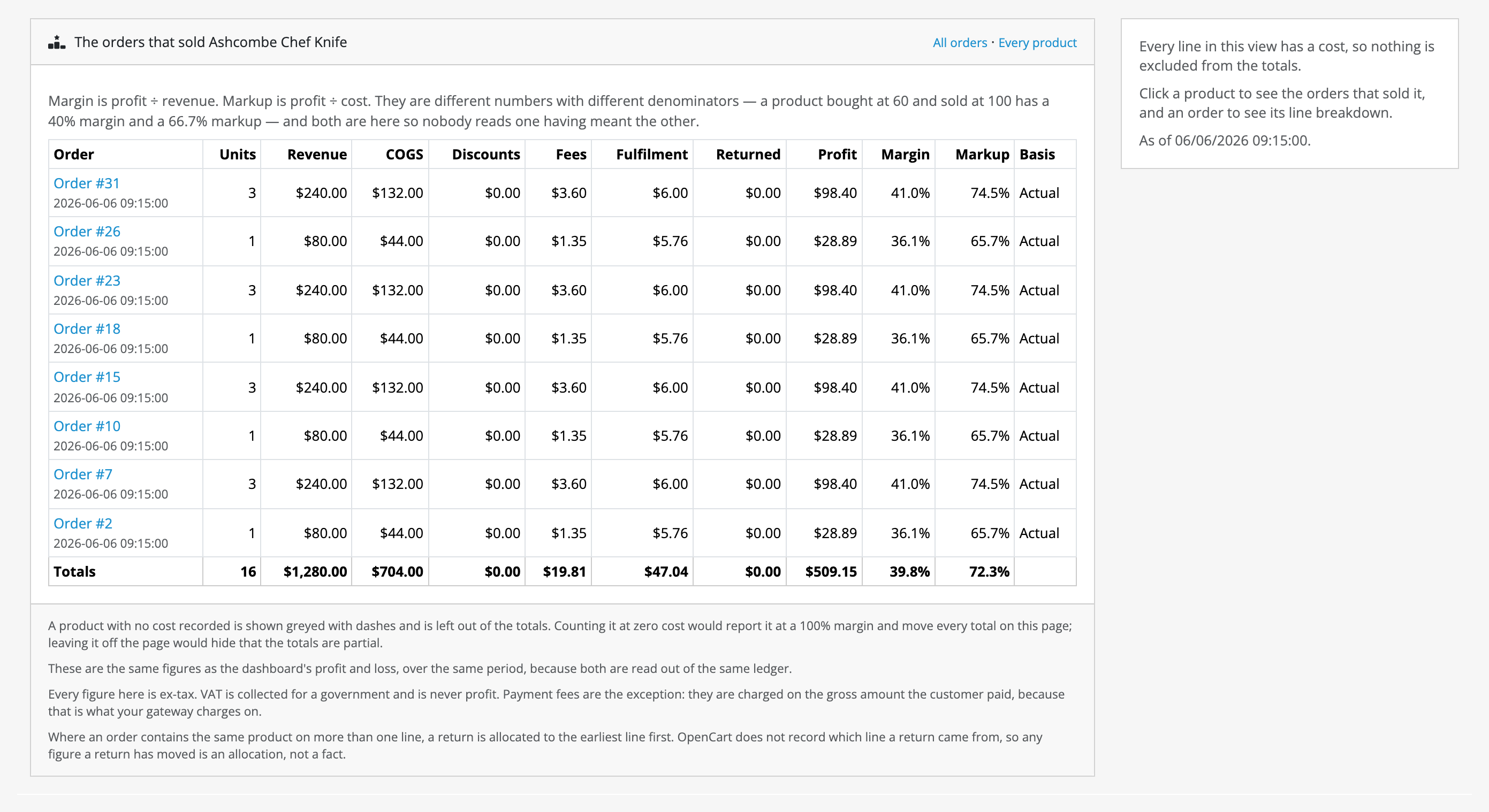
This is Product profit one level down: the orders that sold one product, each broken into what it brought in and what it cost. Clicking a product got here, and clicking an order opens its lines.
Who it is for
- Store owners whose revenue is up and whose bank balance is not, who want to know which products, which payment methods and which discounts are the reason.
- Stores that know what their goods cost, or can put it in a spreadsheet, and want profit worked out from it without a second system.
- Anyone who needs to hand profit figures to a bookkeeper or a reporting tool, as CSV or over a read-only API.
What it does today
- Adds a cost field to OpenCart's own product form, in the Price section, behind a permission of its own. The Cost book screen takes and gives the whole catalogue's costs as one CSV.
- Records every order line when its order changes status: revenue, cost, its share of the order's coupon or reward-points discount, the payment fee and the fulfilment cost.
- Works out payment fees and fulfilment costs from rules you type in per method: a percentage and a fixed amount per payment method, and a flat amount, a percentage of the shipping charged, or the shipping charged itself per shipping method.
- Takes returns off, read live from OpenCart's own return records, with the cost coming back only for a return reason you mark as resellable.
- Keeps operating expenses (rent, software, salaries, advertising) as rows you type in, one-off, weekly or monthly, spread across the days they cover, with blended ROAS off the rows you mark as advertising.
- Adds a Profitability group to the admin menu: Dashboard, a profit and loss for any period with a feed of at most five things worth looking at; Product profit, drilling from product to order to line, with every order also listed on its own, the one that lost most first; Cost book; Expenses; and Settings. Both reports export to CSV.
- Shows the margin and markup a product's price makes over its cost under the cost field on the product form, in red when the price is at or below cost.
- Reaches backwards only when you ask: Back-fill the last 12 months, Recalculate from a date and, for one order, Recalculate this order reprice past orders at today's costs and label every line they write as reconstructed, for good.
- Answers a read-only JSON API, one day at a time, which ships switched off. See the API.
What it does not do
This list is here so that you do not buy Profitability Copilot for something it will not do. Limits and guarantees states each of these exactly.
- It does not reach backwards on its own. Figures start the day you switch it on. Orders from before that have none until you back-fill or recalculate.
- It does not guess a cost. A line nobody has costed is left out of revenue and cost alike, and counted separately, unless you set a default margin.
- It reads no fees from your payment provider. A fee is what your rule says. A method with no rule costs zero, and the dashboard names it.
- It has no weight-based fulfilment rule, no cost per option value, no cost history and no variant inheriting its master's cost.
- It does not spread expenses across products. Rent and advertising come off the store-wide figure only, and ROAS is blended across all advertising.
- It connects to no ad platform, accounting package or ERP. Advertising spend is typed in; figures leave as CSV or over the API.
- It does not know which order line a return came from, because OpenCart does not record it. Where one product sits on two lines of an order, the return is allocated to the earliest.
- It sends no email and runs nothing on a schedule.
- It changes nothing in your storefront, and nothing on OpenCart's own order page or product list.
- The cost permission does not hide cost of goods. Anyone who may open the dashboard or Product profit can read it there, and anyone holding an OpenCart API credential can read it over the API once that is switched on.
Where to go next
- Requirements & install: what the store needs, and what is specific to installing Profitability Copilot.
- Quick start: from installed to a first profit figure.
- Guides: costing a catalogue, pricing fees, recording expenses, reaching back over old orders.
- Reference: the settings, the cost bases and the API.
- Limits & guarantees: exactly what Profitability Copilot promises, and where that promise stops.
- Troubleshooting: when it does not behave.
- Changelog: what changed in each release.
Whichever extension you bought, the shared pages apply to it too.