Wishlist
Wishlist takes over your store's wishlist and gives it the four things OpenCart's own has never had: it works for shoppers with no account and survives their browser closing, every list has a link the owner can hand to somebody else, one button moves a whole list into the cart, and logged-in customers are emailed when something they saved drops in price or comes back in stock.
Then it tells you what all of that adds up to: Reports → Most Wishlisted, one row per product, split into customers and guests, with how many people are waiting for it to come back into stock.
Who it is for
- Store owners whose wishlist button already works for the people who have accounts, and does nothing worth having for the majority who do not.
- Anyone who would rather know what shoppers want and cannot have than guess at a reorder.
- Stores where a saved product going back into stock is a sale, if only the person who saved it heard about it.
- Shops selling gifts, where the list exists to be handed to somebody else.
- Administrators who are not comfortable at a command line. Everything here happens in the OpenCart admin. The one thing outside it is that the scheduled alert sweep needs something to run it, and a web address fetched from your host's cron panel will do.
What it does today
- A wishlist for shoppers with no account, kept in a first-party cookie that names a row and not a person. Closing the browser does not lose it; an expired session does not lose it.
- One list per shopper, merged on sign-in. Somebody who saved four things as a guest and then logs in has four things, not two lists, and saving the same product twice never doubles it.
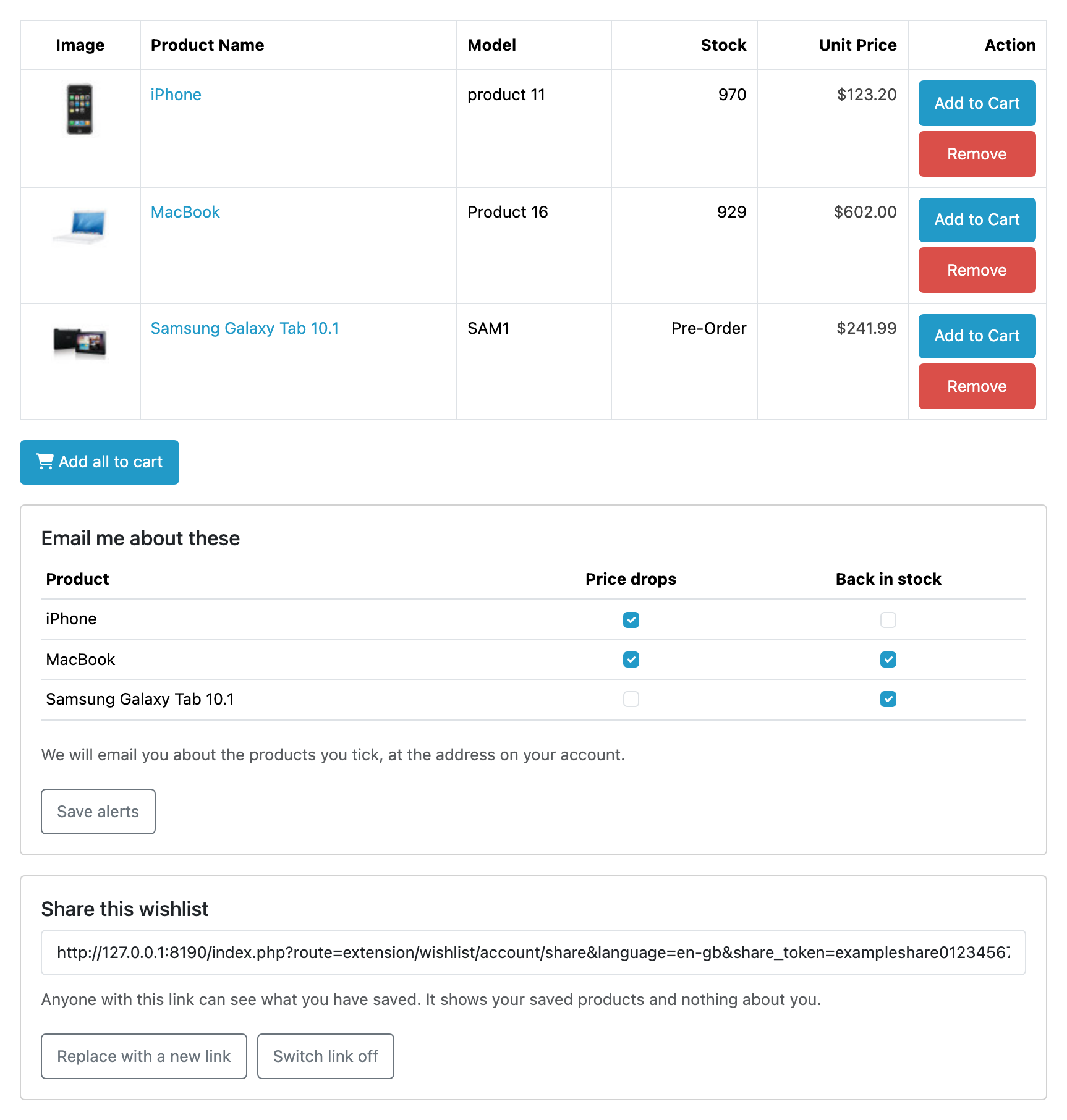
- A share link per list. The owner presses one button; anyone with the link sees the saved products and nothing at all about the owner. Replacing the link revokes the old one on the spot.
- Add all to cart, from the shopper's own list and from a shared one. What can go in goes in; the rest is named, one line each, with the reason.
- Price-drop and back-in-stock emails for logged-in customers. Saving a product signs that customer up for both, and the tick-boxes on their own wishlist page are how they narrow it or turn it off. Nothing in the admin can switch one on. One email per customer per store per sweep, in their own language, from the store they shop at.
- A one-click unsubscribe in every alert, which works with no session and stays off afterwards, including through the customer's next wishlist add.
- Reports → Most Wishlisted: every saved product, how many customers and how many guests saved it, how many are waiting on stock, how many are watching the price, and what it costs and holds right now. Five filters, a button through to the product, and Download CSV for every matching row as a spreadsheet.
- A "Your wishlist" box you can place on any layout, which shows each shopper their own most recent saves beside the page they are on, guest or signed in. It is placed in Design → Layouts and shows nowhere until you place it.
- A Wishlist tab on the customer record, where you can see and edit what one customer has saved. What they asked to be emailed about is shown and never switched on from there.
- Your theme, untouched. No template to edit and no core file changed. The wishlist button your theme already draws now leads to Wishlist's page, and the only pages carrying any markup of ours are the wishlist pages themselves and any page you place the Wishlist box on.
- A read-only JSON API, off until you switch it on, so the system that keeps your own records can read the alert rows and the same demand figures the report shows. It never writes, and it never reads a guest list, a share link or an email address. See the API.
- Answers for data protection: Customers → Personal Data looks up, exports and erases what Wishlist holds about one person, and a screen of its own removes everything it holds about everybody, without uninstalling. See what this holds about a person.
- An update keeps everything. No table is ever dropped, and your settings, both alert switches included, come back from Wishlist's own copy of them.
- Uninstalling hands the wishlist straight back to OpenCart, with every logged-in customer's saved products exactly where core keeps them.
What it does not do
This list is here so nobody buys Wishlist for something it will not do. The full version is limits and guarantees; read it before you buy.
- Alerts are for logged-in customers only. A guest has no email address, and asking for one is a consent and unsubscribe surface this version does not have. Guests get persistence, sharing and bulk add-to-cart.
- Guest wishlists are not browsable in admin. A guest is a count in the report and nothing else. There is no customer record to hang a panel off, and nothing identifying is stored to look one up by.
- OpenCart's own scheduler does not run on OpenCart 4.1.0.4. It is broken on that release for every extension on the store rather than this one, and the repair is upstream's. Wishlist ships two doors onto both scheduled jobs that do not use it (a web address and a command), so nothing is lost there once one of them is set up. The storefront wishlist is unaffected either way.
- One wishlist per shopper. No named lists, no move to another list, no copying between them.
- No promotional email, no your saved item is nearly gone nudges, no reserving stock for somebody who saved it, and no revenue attribution.
- No all-time demand figure. Every number in the report counts what is on somebody's wishlist right now, so removing an item lowers it.
- Nothing is sent by a page view. Alerts go out on a scheduled sweep, hourly at most, and something has to be running it: OpenCart's own scheduler, a web address fetched from a cron panel, or a command from a crontab line.
The rest of this section
- Requirements & install: what the store needs, and the steps to get Wishlist running in it.
- Quick start: the shortest path from installed to useful.
- Guides: task-shaped walkthroughs.
- Reference: the settings, the alerts, the API, what it holds about a person, its security verdict and what it costs, generated from the code.
- Limits & guarantees: exactly what Wishlist promises, and where that promise stops.
- Troubleshooting: when it does not behave.
- Changelog: what changed in each release.
Whichever extension you bought, the shared pages apply to it too.