Product Configurator
Product Configurator adds conditional options to OpenCart's own product options: rules of the form when these answers hold, show, hide or require this option, or this one value of it.
A customer picks a wooden frame and the stain options appear. They pick aluminium and the stain disappears. They pick a motherboard and the memory sizes it will not take vanish from the list. It happens as they click, with no page reload, and the same rules are enforced on the server when they add to the cart, so a stale page or a hand-built form cannot buy a combination you do not sell.
The rules are written on a tab of OpenCart's own product form, in a sentence:
WHEN  Frame material  is  Aluminium
THEN  hide  the option  Wood stain
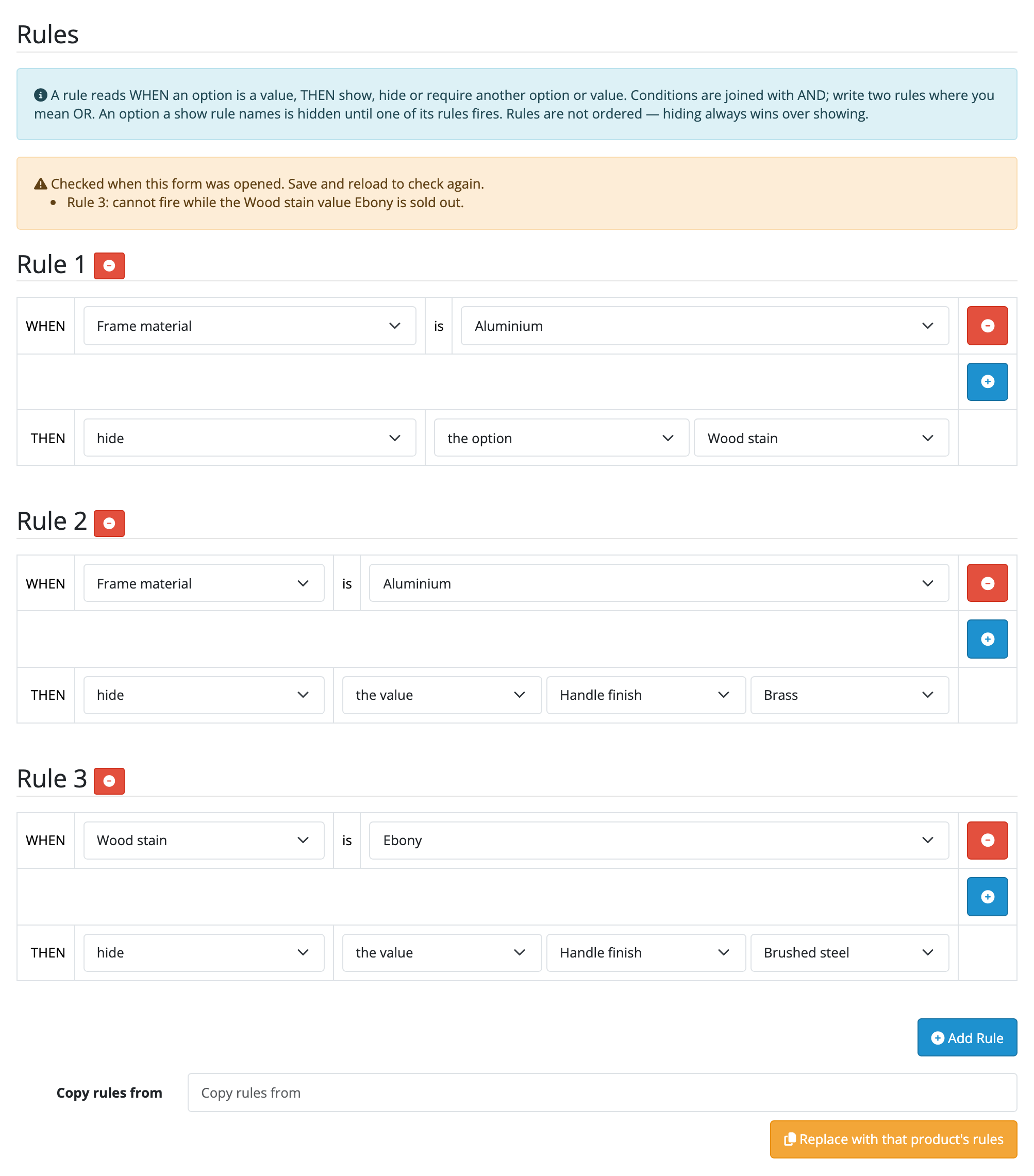
Everything else about an option stays OpenCart's. The price a value adds, the stock it holds, how the choice prints on the order page, the invoice and the order emails all keep working as they did, because every answer your customer gives is an ordinary OpenCart option answer. OpenCart already does five sixths of what a configurator needs, and this extension adds the sixth.
Who it is for
- Stores selling anything built to order (furniture, blinds, print, signage, bikes, PCs) where half the questions only apply depending on the answer to another one.
- Store owners whose product pages currently ask every customer every question, with (only for wooden frames) in the label.
- Anyone selling components that do not all fit each other, who needs the incompatible choice to disappear rather than be refused at the end.
- Store owners who want their colour and material values shown as swatches instead of a thumbnail glued to a label.
- Administrators who do not want to touch a theme. Nothing here needs a template edit.
What it does today
- Rules that show, hide or require an option, or one single value of an option, based on the answers a customer has already given.
- Conditions joined with AND, as many as you like on one rule, written against any select, radio or checkbox option.
- Hidden by default when you want it: naming an option in a
showrule is what makes it appear only in the configuration that calls for it. - Instant on the page. Options and values appear and disappear as the customer clicks, with no reload, on the page your theme already renders.
- Enforced on the server, by OpenCart's own validation, with OpenCart's own messages, on the storefront, through its API, and in the admin order editor.
- Written on the product form, on a Configurator tab, saved by the product form's own Save button. No second screen, no second save.
- Rules against options you have not saved yet: add an option and write a rule about it in the same sitting.
- Image swatches for option values, from the image OpenCart already holds on the value, with no image field and no upload of its own.
- A Change options link on the cart, so a customer fixes one field of a long configuration instead of rebuilding it.
- Copy a product and the rules come with it, which is how ten products get the same configurator.
- Copy rules from another product onto one you already have, from its Configurator tab, stored by the product form's own Save.
- Warnings on the Configurator tab about a required option with nothing left to pick and a rule that can never fire, as of when the form was opened.
- Delete a product and its rules go with it.
- Off until you switch it on, and switching it off changes nothing anywhere while keeping every rule you wrote.
What it does not do
This list is here so that nobody buys Product Configurator for something it will not do.
- No live preview. Configuration is a form: no 2D composite, no 3D view, no artwork to upload.
- No reusable configurator template. Rules belong to one product. Copying a product, or copying its rules onto another, makes a second set rather than a shared one.
- No percentage price modifiers, and no rule that changes a price. An option value adds the fixed amount OpenCart's own Option tab holds. OpenCart sums those prices somewhere no extension can reach.
- No multi-step wizard. Options render as one flat list, the way your theme draws them.
- No stock of its own. Per-value quantity and subtract stock stay OpenCart's, and keep working untouched.
- Nothing new in the admin order screen, the invoice or the order emails. OpenCart already prints every chosen option in all three, and this adds nothing to them and stores no record of its own against an order.
- Hiding is availability, not secrecy. Every option and value attached to the product is in the page source whether a rule reveals it or not. It is not a way to hide a trade customers only option.
- Conditional options need JavaScript in the customer's browser. Without it every option shows, and the rules are still enforced when they add to the cart.
- Rules do not reach cart lines already added, and nothing is re-checked at checkout. That is what OpenCart does with its own option validation too.
- The warnings advise and never prevent. You can still save a dead end, and stock that runs out after the form was opened gets no warning.
- No message of your own on a refusal. The wording is OpenCart's.
- No refusal at save time. A half-built ruleset saves, because a screen that discards half a ruleset is worse than one that does nothing yet.
- Deleting a master product leaves its promoted variants without the rules they were inheriting, with no warning. Copy rules from puts them back, one product at a time.
For the exact boundaries (what a customer with JavaScript off sees, what a refusal says and why, what happens to a line already in the cart, and what an update and a removal keep), read limits and guarantees before you buy.
Where to go next
- Requirements and install
- Quick start
- Guides
- Reference
- Limits and guarantees
- Troubleshooting
- Changelog
Whichever extension you bought, the shared pages apply to it too.