Import/export
Import/export imports data into an OpenCart store in bulk, and shows you exactly what it is going to change before it changes anything.
An import happens in two steps that are deliberately kept apart. First Import/export reads your file and writes a plan: every product it would create, every field it would alter with the value that field holds right now, and every row it had to reject. Nothing has been written at this point; you can close the browser and come back to it. Then, once you have read the plan, you apply it. Applying writes exactly what the plan described and nothing else, recording the previous value of every field it touches, so the whole job can be rolled back afterwards.
That is the entire product: know first, write second, undo if you were wrong.
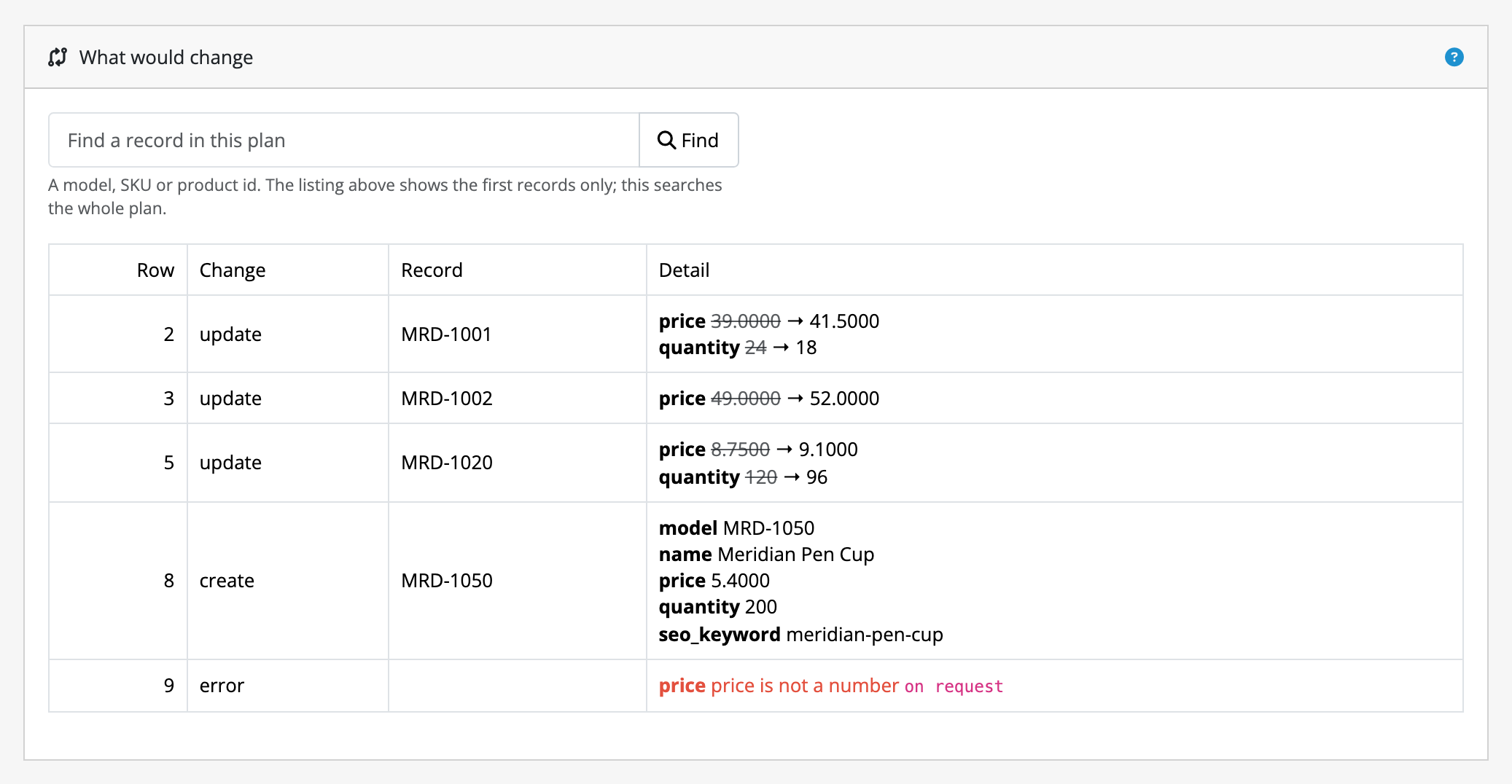
This is a plan for a supplier's price and stock file. Every change is shown as
the value the field holds now and the value the import would write, a new
product is listed with everything it would be given, and the row whose price
read on request is rejected rather than guessed at. Nothing above has been
written to the catalogue.
Who it is for
- Store owners taking a supplier's price or stock file and putting it into their catalogue, repeatedly, without hand-editing rows.
- Anyone migrating a catalogue into OpenCart who wants to see the damage before it happens rather than afterwards.
- Stores whose
oc_producttable has been extended by another extension. Import/export reads your store's actual columns rather than shipping a fixed list of fields it knows about, so a column another extension added is mappable with no configuration and no code change. - Administrators who are not comfortable at a command line. Everything happens in the OpenCart admin.
What it does today
- Imports products, categories, manufacturers, attribute groups, attributes, options, option values, filter groups, filters, coupons, reviews, downloads, stores, orders and customers from CSV, TSV, plain text, XML, JSON, XLSX and ODS files, including those files inside a zip archive.
- Builds a category tree from a flat file: a path such as
Home > Widgets > Bluefiles the category where it says, creating the levels above it that your store does not have yet. - Takes its source from an upload, an
http/httpsURL, or a path on your own server that you have nominated. - Maps any column in your file to any column your store actually has, including
the product tables beyond
oc_productitself and tables belonging to other extensions. - Writes a constant value to every row for fields your file does not carry.
- Assigns filters to categories, either replacing what a category offers or adding to it, so a file of new facets does not drop the ones already there.
- Transforms values on the way in (trimming, case, arithmetic, lookups and so on), with the result of the transform shown in the plan as the literal text that will be written.
- Says on a product's own edit form where its data came from, when the import that wrote it carried an Import label: the label, the job and the date. Answering "did somebody type this, or did a feed?" takes one look at the product rather than a search through the job history.
- Handles multi-language stores: every piece of text is one field per installed language, and a language your mapping says nothing about is left alone.
- Assigns imported records to the stores you nominate on a multi-store install.
- Downloads and installs product images, staged while planning so that a broken image URL is a problem you see in the preview.
- Counts anomalies as the plan is built (a price that moved further than you allow, stock falling to zero, a record losing all its categories, a source suspiciously smaller than last time) and refuses to apply until you have acknowledged them.
- Optionally mirrors a source, deleting or disabling records the file no longer carries, behind guards that are off until you turn them on.
- Runs long jobs in slices, so a file of 200,000 rows does not depend on your server's script time limit, and a job can be paused, resumed or cancelled.
- Rolls an applied job back, previewing the rollback first.
- Saves a finished configuration as a profile and runs it again in one step, or on a schedule (hourly, daily, weekly or monthly) using the cron your store already runs, with nothing to install on the server. A scheduled run either stops at a plan for you to read or applies itself, whichever you chose; a run that turns up anomalies always stops and emails you. An export can be saved and scheduled the same way, so the feed URL below always has a fresh file. Every run is listed in the admin with its counts, how long it took and what went wrong.
- Runs any profile from the command line, exiting non-zero when the run failed, for a schedule finer than four cycles or for a deploy pipeline.
- Exports every one of those kinds of record to a file (CSV, TSV, XML, JSON, XLSX or ODS) in the same shape it reads them back, so you can export the catalogue, change what you meant to change in a spreadsheet, import the file again, and review a preview that shows only your own edit.
- Narrows an export to the records you want: named categories in or out, a manufacturer, a store, part of a model, a stock range, the dates a record was added or last changed, and only the languages you asked for, sorted by a column of your choosing.
- Hands the most recent finished export to an outside system over a secret-bearing URL, so a marketplace uploader or a warehouse can fetch the file without an admin login. The URL serves what an export already made, by hand or on a schedule, with when it was made; it never runs a job. It is off until you set the secret, and it serves catalog data only: orders, customers and coupons are never handed out this way.
- Writes the fields your file does not carry, such as a description or a meta title, with a language model, using your own provider account. The text is generated while the plan is made, so the preview shows the literal sentence apply will write, and rollback puts back what was there before.
What it does not do
This list is here so that you do not buy Import/export for something it will not do.
- An export is one kind of record per file, and the feed URL never makes one. Products and categories are two exports. You choose the fields, the format, which records to reach and what order they come out in. A schedule can make catalogue exports, but never of orders, customers or coupons, and the feed URL hands out the newest finished export rather than making a fresh one.
- Passwords are never imported. A customer this creates arrives with their name, contact details, group, newsletter preference, every address and whether they are still awaiting approval, but with no password and no way to give them one. They sign in again by using your storefront's Forgotten Password link. There is no field for a password, plain or hashed, and there will not be one.
- Records are matched as follows: products on their
model,sku,upc,ean,jan,isbnormpn(on the last five, a value two products share is refused rather than guessed), categories on their full path, stores on their name or their URL, manufacturers, attribute groups, attributes, options, option values, filter groups and filters on their name, coupons on their code, downloads on their filename, customers on their email address, and reviews and orders on their own identifier. An option value, a filter or a customer is also matched on its own identifier where your file carries one. - An order import is historical migration, not order creation. Import/export writes the order, its line items, its totals and its status history directly: no stock comes off the shelf, no reward points or coupon redemptions are recorded, and nobody is emailed. Totals are taken from your file and never recalculated. It is how you bring a sales history over from another platform, not a way to place orders.
- A download is a record, not a file. Import/export writes what the store serves and under what name; putting the file on the server is still yours to do.
- A store is a row, not a configured shop. Importing stores creates the records; their settings are filled in on OpenCart's own store form.
- A category's path is its identity, so Import/export does not move categories. A feed that files the same name under a different parent describes a second category; the first is still where it was, for you to remove deliberately.
- A schedule is as fine as your store's cron. Import/export offers hourly, daily, weekly and monthly, and only runs when your store's cron runs, so an hourly profile on a store whose cron fires twice a day runs twice a day. For anything more exact, put the command-line runner in a crontab line.
- A scheduled run does not decide anything for you. It applies only if you told that profile it may, it stops on anomalies whatever you told it, and it never applies part of a plan. Instead of guessing, it stops and says so, in the admin and by email.
- Generated content needs your own provider account, and is off until you set one up. Import/export sells you no tokens and includes no key: you supply an Anthropic or OpenAI key, and what the provider charges is between you and them. Nothing is generated for a job that does not ask for it, and a field your file already filled is left alone unless you say otherwise.
- It does not tidy up after your suppliers. A row with a price of
abcis rejected and reported, not silently turned into0.00. Import/export tells you your file is wrong; it does not guess what you meant. - It is not a general database editor. It writes the fields your plan describes and no others. It will not, for example, stamp a product's modified date just because it touched the product.
For the exact boundaries of the rollback promise, read limits and guarantees. It is the page worth reading before you buy. The same page states the security posture: what an administrator granted Import/export's permission can reach, and what it is stopped from reaching.